The personal economics of programming languages

An attempt to answer a student’s question about what programming language to learn.

Recently, one of my students asked a good question about what programming languages I would recommend learning. His ideal language would be “syntactically ugly, but giving insights that are universal to programming”. My first reaction was to answer that he has just described Perl, but that was too easy of an answer. So I tried to define the basics about programming languages, starting with the personal economics.

Economics of programming languages

An organization that wants to produce a piece of software needs to answer a lot of questions like “what programming language will be best suited for the task?”. Often, these questions get diluted and rather sound like “what programming language should we stipulate for all our projects, now and forever?”. That’s when politics and economics overlap and intermingle. We can leave this problem for the organizations to solve themselves. But if we scale the question down to an individual programmer – you, what influences are there to find an answer to the question “what programming languages should I learn?”.

I try to answer with the concept of utility: Learn those languages that, over a reasonable time, yield the most “utility”. There are at least two types of utility in our profession: money and joy. You can learn a programming language because your job requires it (money) or because you are curious and/or dig its particularities (joy). Most of the time, a specific programming language contains a mixture of both utilities for you. How you rate those utilities is up to you and probably varies from situation to situation. If you start a private fun project, picking the boring mainstream language from work might get things get done faster, but when would you want the fun to be over sooner?

Let me give two extreme examples for this concept:

  • If you start to learn COBOL now, chances are high that you will achieve two things: You will be disgusted by the language and the existing codebase, but delighted by the salary and job security. COBOL is a high money-utility programming language. It ranks low in any survey or statistics about programming languages, but is widely used in big business today and tomorrow. You might refer to https://blog.hackerrank.com/the-inevitable-return-of-cobol/ for more information.
  • If you start to learn Esterel now, you might experience two things over time: an epiphany about how flawed our concept of time is in most programming languages and an existential crisis because your brain isn’t capable to wrap itself around most sourcecode. Whatever comes first will define your learning success. There are virtually no jobs that require Esterel (even if some might benefit from it) and you can only program and build so many bicycle computers in your spare time (this is a typical introduction project to Esterel). Esterel is a pure joy-utility programming language. You can claim to be proficient in synchronous programming afterwards, but nobody will know what that even is.

A third type of utility

But I think that there might be a third type of utility for personal learning choices based on economics: The stirrup iron utility. Knowledge of some programming languages isn’t useful from a money-driven viewpoint and may lack enjoyability, but it serves as a door-opener to more enjoyable or sellable languages. It serves as an interim utility because it doesn’t have value in itself, but serves as a multiplier for either the money or joy utility. To rate the value of this utility to your career, you need to be clear about your career goals, especially your anticipated skill portfolio.

Skill portfolio shapes

Modern recruitment differentiates between several skill portfolio shapes, most noteably the “I” and “T” shape:

  • Programmers with “I”-shaped skill portfolios are experts in one specific field of programming. They might, for example, be the best C# programmer you’ve ever met. But they flop around like a fish out of water once they need to use another programming language. They will choose their familiar tools for every problem that needs to be solved and will solve it fast if possible or
  • Programmers with “T”-shaped skill portfolios have knowledge across all fields of programming, albeit limited, and drilled down into one field specifically. Why they chose to master their field can mostly be explained with the money or joy utility. They probably gained their broad knowledge base by using stirrup irons.

If you happen to know what’s expected from you until your retirement (let’s say you chose to program in COBOL), the “I”-shape is a viable and efficient strategy to manage your skill portfolio. There is nothing wrong with this approach (as long as it works).

If you have a hunch that you don’t have the capability to invest in broad knowledge, the “I”-shaped skill portfolio is your logical choice. It takes a lot to be able to come to a self-assessment that shows your limitations. It’s a good thing to know your limits and build a career within them. A lot of programmers don’t know their limits and burn out, because not meeting the requirements produce a lot of stress (on both sides). Better be yourself than over-promise and under-deliver constantly.

The “T”-shape means that you need to invest your time wisely. And we are not talking “work time” only, but “life time”, because you’ll probably need to spend your spare time working on your portfolio, too. Becoming a “jack of all trades” programmer is an endeavour of at least ten years without any possibility to shortcut. You need to select your jobs in accordance to your learning strategy and always be receptive to opportunities. You need to improve your learning abilities. You need to do so much at once that I suggest you start by watching Cory House’s talk about “Becoming an Outlier”. He’s spot on with so many things.

Stirrup iron programming languages

There are some programming languages that can be seen as the archetypes of a whole class of languages. Most knowledge of these archetypes can be directly applied or transfered to each language in the class. It’s the language’s concepts that are the real benefit. If you understand the synchronous programming aspect in Esterel, you’ll recognize it straight away in languages like LabView or SIGNAL. It may even just be a part of the other language (like in many multi-paradigm programming languages), but it will be familiar to you.

So what are some stirrup iron languages?

That’s a tough question and I want to place it out there. Can you drop a comment and name the programming language that had the most peculiar influence on your knowledge? I would like to refer to the book Seven Languages In Seven Weeks from the Pragmatic Bookshelf. It covers Ruby, Io, Prolog, Scala, Erlang, Clojure and Haskell. Do you agree with that selection? I would like to hear from you.

There are some ideas about this topic already: The talk “The Future of Programming” from Bret Victor (if you don’t know this guy already, please watch his legendary “Inventing on Principle” too). Richard Astbury presents three “new” hot programming languages (with matching outfits) in his talk “The State of the Art”. And Robert C. Martin is sure to have found “The Last Programming Language”.

One thing is sure: We should train the next generations of programmers in those stirrup iron languages, so they can quickly grasp the language flavour of the year. This is mostly done already, of course, but the students inevitably complain about the “weird” choices. So we need to explain upfront the economics of programming languages.

And, in a lighter tone at the end, there is always the ongoing competition for the worst programming language ever.

My C++ Tool Belt

I suspect that every developer has a “tool belt” that he or she uses to be productive. By that I mean a collection of tools, libraries and whatever else helps. With a few exceptions, these tool belts will probably be language specific, or at least platform specific. As my projects updated their compilers and transitioned to C++11 and beyond, my C++ tool belt changed quite a bit. Since things like threading, smart pointers and functional abstractions where added to the standard library, those are now already included by default. Today I wanna write about what is in my modernized C++11 tool belt.

The Standard Library

Ever since the tr1 extensions, the standard library has progressed into becoming truly powerful and exceptional. The smart pointers, containers, algorithms are much more language extensions than “just” a library, and they play perfectly with actual language features, such as lambdas, auto and initializer lists.

fmtlib

fmtlib provides placeholder-based text formatting a la Python’s String.format. There have been a few implementations of this idea over the years, but this is the first where I think that it might just dethrone operator<< overloading for good. It's fast, stable, portable and has a nice API.
I begin to miss this library the moment I need to work on a project that does not have it.
The next best thing is Qt’s QString::arg mechanism, with slightly inferior API, a less inclusive license, and a much bigger dependency.

spdlog

Logging is a powerful tool, both for software development and maintenance. Chances are you are going to need it at one point. spdlog is my favorite choice for this task. It uses fmtlib internally, which is just another plus point. It’s simple, fast and very nice to use due to reuse of fmtlib’s formatting. I usually just include this in my projects and get the included fmtlib for free.

optional

This one is actually part of the most recent C++17, but since that is not widely available yet (meaning not many projects have adopted it), I’m going to list it explicitly. There are also a few alternative implementations, such as the one in Boost or akrzemi1’s single-header variant.
Unlike many other programming languages, C++ has a relatively high emphasis on value types. While reference types usually have a built-in “not available” state (a.k.a. nullptr, NULL, Nothing or nil), an optional can transport intent much clearer. For value types, however, it’s absolutely mandatory to have an optional type. Otherwise, you just end up wrapping the value in a pointer just to make it optional.
Do not, however, fall into the trap of using optional for error handling. It’s not made for that, and other abstractions, such as expected are much better for that.

CMake

There is really only one choice when it comes to build tools, and that’s CMake. It’s got its own bunch of weaknesses, but the goods far outweight the bads. With the target_ functions, it’s actually quite nice and scales really well to bigger projects. The main downside here is that it still does not play nice with some tools, most notably visual studio. CLion and QtCreator fare much better. Then again, CMake enables the use of other tools easily, such as clang-tidy.

A word on Boost

Boost is no longer the must-have it once was. Much of the mandated functionality has already been incorporated into the standard library. It is no longer a requirement for a sane C++ project. On the contrary, boost is notoriously huge and somewhat cumbersome to integrate. Boost is not a library, it is a collection of libraries, therefore you can still decide whether to use Boost on a library by library basis. However, much of that is viral, and using a small part of Boost will easily drag in a few hundreds of other Boost headers. The libraries I tend to include most often are Boost.Utility (for boost::noncopyable) and Boost.Filesystem. The former is obviously easy to do without Boost, especially with = delete; and the latter is a part of the standard library since C++17. I hope to be doing the majority of my projects without it in the future. Boost was a catalyst for most of the C++ progress in recent years. It slowly becoming obsolete, either by being integrated into the standard or it’s idioms no longer being needed, is just a sign of its own success.

My honorable mentions are Qt and the stb single file libraries. What are your go-to tools?

Analyzing iOS crash dumps with Xcode

The best way to analyze a crash in an iOS app is if you can reproduce it directly in the iOS simulator in debug mode or on a local device connected to Xcode. Sometimes you have to analyze a crash that happened on a device that you do not have direct access to. Maybe the crash was discovered by a tester who is located in a remote place. In this case the tester must transfer the crash information to the developer and the developer has to import it in Xcode. The iOS and Xcode functionalities for this workflow are a bit hidden, so that the following step-by-step guide can help.

Finding the crash dumps

iOS stores crash dumps for every crash that occured. You can find them in the Settings app in the deeply nested menu hierarchy under Privacy -> Analytics -> Analytics Data.

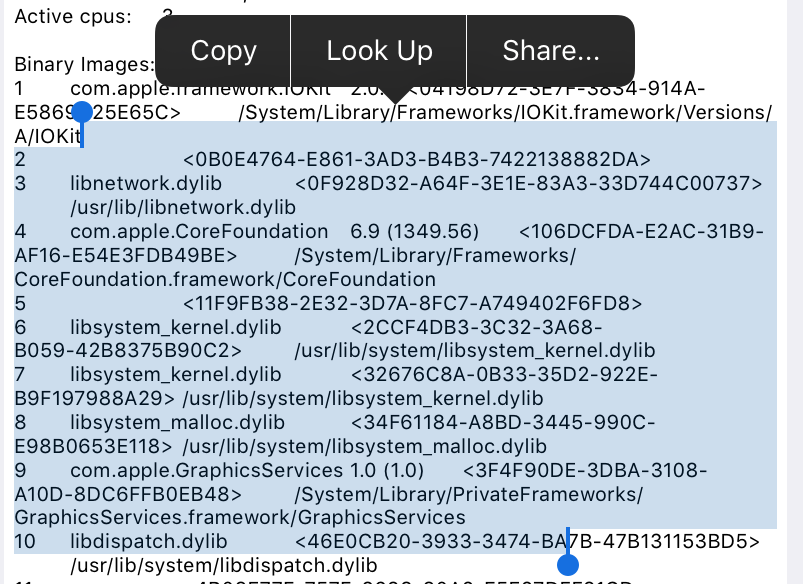
There you can select the crash dump. If you tap on a crash dump you can see its contents in a JSON format. You can select this text and send it to the developer. Unfortunately there is no “Select all” option, you have to select it manually. It can be quite long because it contains the stack traces of all the threads of the app.

Importing the crash dump in Xcode

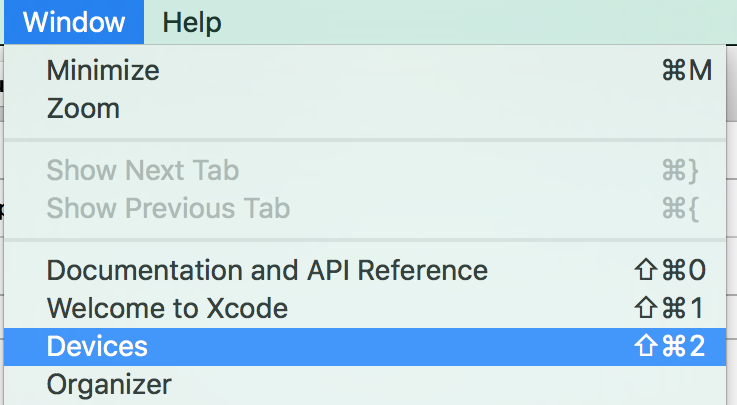
To import the crash dump in Xcode you must save it first in a file with the file name extension “.crash”. Then you open the Devices dialog in Xcode via the Window menu:

To import the crash dump you must have at least one device connected to your Mac, otherwise you will find that you can’t proceed to the next step. It can be any iOS device. Select the device to open the device information panel:

Here you find the “View Device Logs” button to open the following Device Logs dialog:

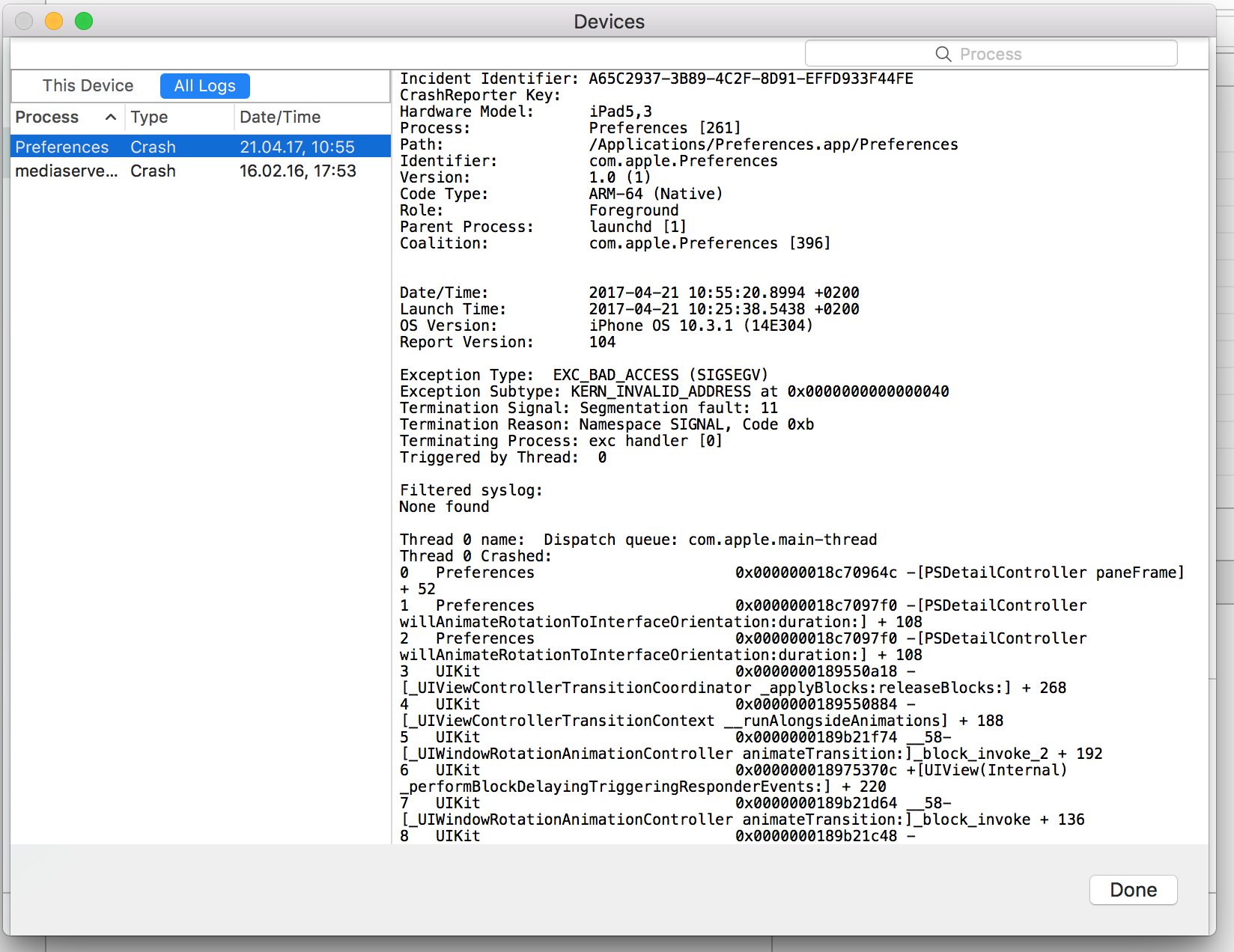
To import the crash dump into this dialog select the “All Logs” tab and drag & drop the “.crash” file into the panel on the left in the dialog.

Initially the stack traces in the crash dump only contain memory addresses as hexadecimal numbers. To resolve these addresses to human readable symbols of the code you have to “re-symbolicate” the log. This functionality is hidden in the context menu of the crash dump:

Now you’re good to go and you should finally be able to find the cause of the crash.

About API astonishments

Nowadays we developers tend to stand on the shoulders of giants: We put powerful building-blocks from different libraries together to build something worth man-years in hours. Or we fill-in the missing pieces in a framework infrastructure to create a complete application in just a few days.

While it is great to have such tools in the form of application programmer interfaces (API) at your disposal it is hard to build high quality APIs. There are many examples for widely used APIs, good and bad. What does “bad API” mean? It depends on your view point:

Bad API for the API user

For the application programmer a bad API means things like:

  • Simple tasks/use cases are complicated
  • Complex tasks are impossible or require patching
  • Easy to misuse producing bugs

A very simple real life example of such an API is a C++ camera API I had to use in a project. Our users were able to change the area of interest (AOI) of the picture to produce images consisting of only a part of full resolution images. Our application did crash or not work as expected without obvious reasons. It took many hours of debugging to spot the subtle API misuse that could be verified be reading the documentation:

The value of camera.Width.GetMax() changed instead of being constant! The reason is that AOI was meant and not the sensor resolution width. The full resolution width we actually wanted is obtained by calling camera.WidthMax.GetValue(). This kind of naming makes the properties almost undistinguishable and communicates nothing of the implications. Terms like AOI or sensor width or full resolution just do not appear in this part of the API.

Small things like the example above may really hurt productivity and user experience of an API.

Bad API for the API programmer

API programmers can easily produce APIs that are bad for themselves because they take away too much freedom away resulting in:

  • Frequent breaking changes
  • API rewrites
  • Unimplementable features
  • Confusing, not fitting interfaces

Design your interfaces small and focused. Use types in the interface that leave as much freedom as possible without hurting usability (see Iterable vs. Collection vs. List vs. ArrayList for example). Try to build composable and extendable types because adding types or methods is less of a problem than changing them.

Conclusion

Developers should put extra care in interfaces they want to publish for others to use. Once the API is out there breaking it means angry users. Be aware that good API design is hard and necessary for a painless evolution of an API. Consider reading books like “Practical API Design” or “Build APIs You Won’t Hate” if you want to target a wider audience.

Internationalization of a React application with react-intl

For the internationalization of a React application I have recently used the seemingly popular react-intl package by Yahoo.

The basic usage is simple. To resolve a message use the FormattedMessage tag in the render method of a React component:

import {FormattedMessage} from "react-intl";

class Greeting extends React.Component {
  render() {
    return (
      <div>
        <FormattedMessage id="greeting.message"
            defaultMessage={"Hello, world!"}/>
      </div>
    );
  }
}

Injecting the “intl” property

If you have a text in your application that can’t be simply resolved with a FormattedMessage tag, because you need it as a string variable in your code, you have to inject the intl property into your React component and then resolve the message via the formatMessage method on the intl property.

To inject this property you have to wrap the component class via the injectIntl() function and then re-assign the wrapped class to the original class identifier:

import {intlShape, injectIntl} from "react-intl";

class SearchField extends React.Component {
  render() {
    const intl = this.props.intl;
    const placeholder = intl.formatMessage({
        id: "search.field.placeholder",
        defaultMessage: "Search"
      });
    return (<input type="search" name="query"
               placeholder={placeholder}/>);
  }
}
SearchField.propTypes = {
    intl: intlShape.isRequired
};
SearchField = injectIntl(SearchField);

Preserving references to components

In one of the components I had captured a reference to a child component with the React ref attribute:

ref={(component) => this.searchInput = component}

After wrapping the parent component class via injectIntl() as described above in order to internationalize it, the internal reference stopped working. It took me a while to figure out how to fix it, since it’s not directly mentioned in the documentation. You have to pass the “withRef: true” option to the injectIntl() call:

SearchForm = injectIntl(SearchForm, {withRef: true});

Here’s a complete example:

import {intlShape, injectIntl} from "react-intl";

class SearchForm extends React.Component {
  render() {
    const intl = this.props.intl;
    const placeholder = intl.formatMessage({
        id: "search.field.placeholder",
        defaultMessage: "Search"
      });
    return (
      <form>
        <input type="search" name="query"
               placeholder={placeholder}
               ref={(c) => this.searchInput = c}/>
      </form>
    );
  }
}
SearchForm.propTypes = {
  intl: intlShape.isRequired
};
SearchForm = injectIntl(SearchForm,
                        {withRef: true});

Conclusion

Although react-intl appears to be one of the more mature internationalization packages for React, the overall experience isn’t too great. Unfortunately, you have to litter the code of your components with dependency injection boilerplate code, and the documentation is lacking.

Simple build triggers with secured Jenkins CI

The jenkins continuous integration (CI) server provides several ways to trigger builds remotely, for example from a git hook. Things are easy on an open jenkins instance without security enabled. It gets a little more complicated if you like to protect your jenkins build environment.

Git plugin notify commit url

For git there is the “notifyCommitUrl” you can use in combination with the Poll SCM settings:

$JENKINS_URL/git/notifyCommit?url=http://$REPO/project/myproject.git

Note two things regarding this approach:

  1. The url of the source code repository given as a parameter must match the repository url of the jenkins job.
  2. You have to check the Poll SCM setting, but you do not need to provide a schedule

Another drawback is its restriction to git-hosted jobs.

Jenkins remote access api

Then there is the more general and more modern jenkins remote access api, where you may trigger builds regardless of the source code management system you use.
curl -X POST $JENKINS_URL/job/$JOB_NAME/build?token=$TOKEN

It allows even triggering parameterized builds with HTTP POST requests like:

curl -X POST $JENKINS_URL/job/$JOB_NAME/build \
--user USER:TOKEN \
--data-urlencode json='{"parameter": [{"name":"id", "value":"123"}, {"name":"verbosity", "value":"high"}]}'

Both approaches work great as long as your jenkins instance is not secured and everyone can do everything. Such a setting may be fine in your companies intranet but becomes a no-go in more heterogenious environments or with a public jenkins server.

So the way to go is securing jenkins with user accounts and restricted access. If you do not want to supply username/password as part of the url for doing HTTP BASIC auth and create users just for your repository triggers there is another easy option:

Using the Build Authorization Token Root Plugin!

Build authorization token root plugin

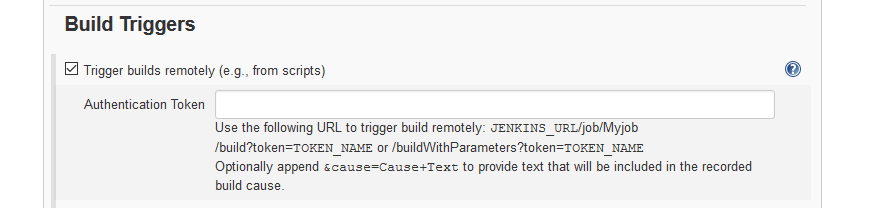
The plugin introduces a configuration setting in the Build triggers section to define an authentication token:

It also exposes a url you can access without being logged in to trigger builds just providing the token specified in the job:

$JENKINS_URL/buildByToken/build?job=$JOB_NAME&token=$TOKEN

Or for parameterized builds something like:

$JENKINS_URL/buildByToken/buildWithParameters?job=$JOB_NAME&token=$TOKEN&Type=Release

Conclusion

The token root plugin does not need HTTP POST requests but also works fine using HTTP GET. It does neither requires a user account nor the awkward Poll SCM setting. In my opinion it is the most simple and pragmatic choice for build triggering on a secured jenkins instance.

Look at the automated tests to diagnose the project ailments

If you have to evaluate a new software project, draw the outline of the existing test types. If it doesn’t look like a pyramide, you might be in trouble. Here are some common non-pyramide outlines and what they mean.

A cornerstone of modern software development is developer testing. That means that developers are the primary authors of automated test code. In theory, that is a good thing and might look like the quality assurance department is out of work soon. In practice, we as a profession tried for nearly twenty years to install a culture of developer testing in our work and still end up with software projects that feature no automated tests at all (Side note: JUnit 1.0 was released in February of 1998).

What we know about automated tests

One piece of common understanding about developer testing is the test pyramide. Let’s iterate quickly what we know about it. There are different kinds of automated tests and the test pyramide differentiates three of them:

  • Acceptance tests or UI tests are the heaviest type of automated test. They operate on the software from the outside, with the means of a real user and try to assert that real use cases are accomplishable.
  • Integration tests often use several parts of the system in a test scenario that asserts the correct collaboration of the parts. Integration tests may take some time to come to a conclusion and utilize real hardware like network or disks.
  • Unit tests tend to be small and quick and focus on a particular aspect of an “unit” like a class or entity aggregate. Their reach into the system should be short and might be forcefully restricted by employing mocks.

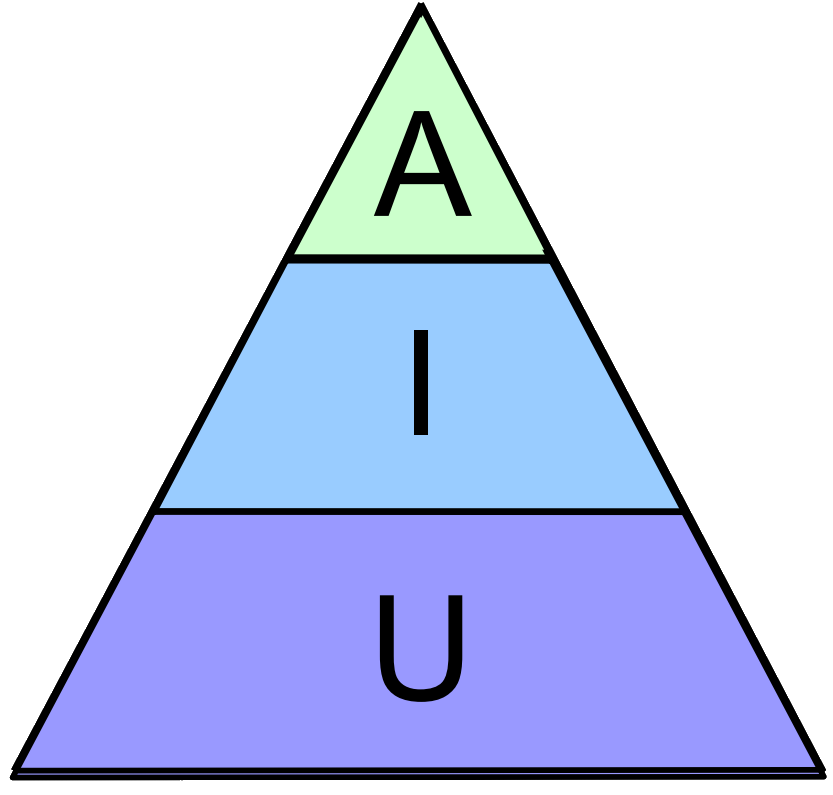
These three types, the A, I and U of automated tests, should come in different numbers. A good rule of thumb is that for every acceptance test, there might be up to one thousand unit tests. If you draw the quantities as areas, they appear in form of a pyramide. A small top of acceptance tests rests on a broader seating of integration tests that relies on a groundwork of many unit tests. A healthy test pyramide looks like this:

Take this picture as an orientation, not as an absolute scale. But be sure to count your different test types from time to time.

Outlining the tests

This is actually one of the first things I do when I get introduced to a new and unknown code base. This happens quite often when I do consulting work for existing development teams. Have a look at the automated tests, determine their type and count their numbers. If it resembles anything close to the test pyramide, you’ve got a chance. If the resulting shape looks different, you might find this blog entry useful:

The Tower

If you have a hard time finding any tests (because there are none) or you find only some half-assed attempts to produce a meaningful automated test suite, you look at a tower project. The tower is rather small in diameter, in the cases of absent tests it is nothing more than a thin vertical line (the “stick”). If you find a solid number of tests for every type, you’ve found a “block” project. Block projects usually don’t have a problem, but a history of test effort migration either from unit to acceptance tests or, more common, in the other direction. If you find a block, you are fine.

The tower, though, is a case of neglect. The project team might have started serious efforts to automated their tests, but got demotivated by intrinsic or extrinsic influences and abandoned the tests soon after their creation. Nobody has looked after them since and the only reason they still pass green is that they didn’t really test anything to begin with or only cover an area of the system that is as finished as it is boring. Topics like user management or utility classes are usually the first and only things that got tests in a tower scenario.

Don’t get me wrong, the tower indicates the absence of tests, but not the absence of willingness to write automated tests, unless the tower is really a stick. A team willing to invest in automated tests may only lack knowledge and coaching about the topic. Be sure to lead them bottom-up (unit tests first), though.

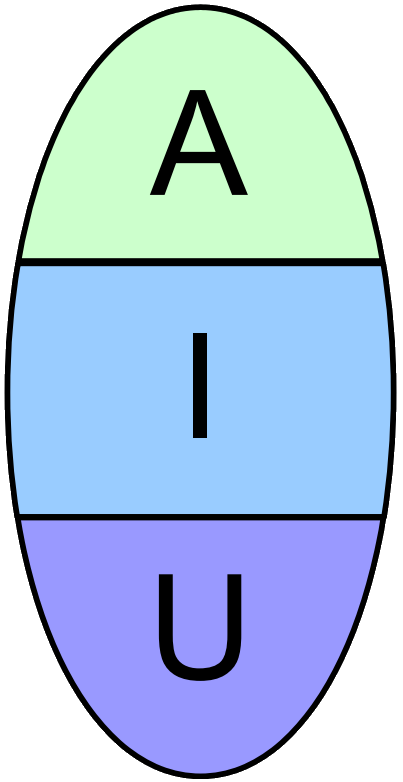
The Egg

If you’ve categorized and counted the tests and couldn’t find many acceptance or unit tests, you’ve found an egg. The egg consists of mostly integration tests that may lean into unit testing territory by asserting smallest bits of functionality here and there (often embedded in an overarching test storyline) or dip their toes into gui-based testing by asserting presentation-specific properties of widget objects. While they provide ample test coverage for the system, they also tie application logic and presentation details together and don’t help to separate domain code from the use cases.

The project team is probably proud of their test coverage and doesn’t see any value in differentiating the automated tests types, because “every test improves the situation”. The blindness to test types is the core problem that may be cured with training and coaching (I’ve found the ATRIP-rules to be particularly effective to distinguish integration and unit tests), but the symptoms, especially the lack of separation of concerns, have to be mitigated soon, too.

One way to start there is to break the tests down into their integration and their unit test parts. You can work from assertion to assertion and ask: is this necessary to ensure the current use case? If not, extract a new unit test focussed on only this one assertion.

As soon as you add a pedestal consisting of unit tests to your egg, you are on your best way to a healthy test pyramide.

The Ice Cream Cone

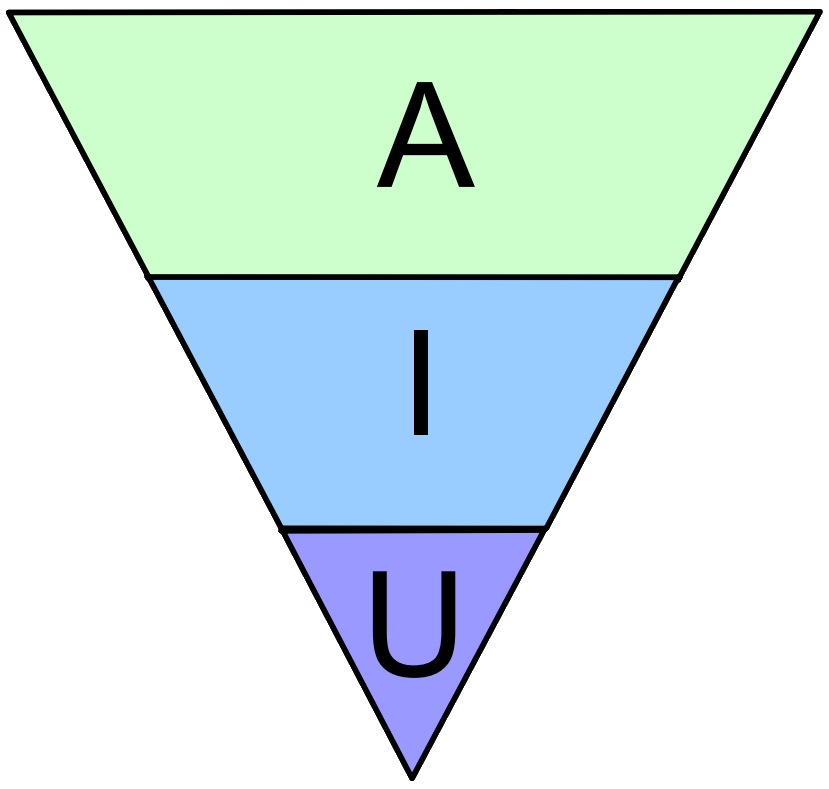
This is the most fearsome automated test outline in existence, even more dramatic than the stick. Usually, the project team is really enthusiastic about writing tests or at least follow order to do so, but they cannot test parts of the application in isolation. A really tragic case was a complex system that was so entangled with its database, through countless stored procedures that contributed to the application logic, that it was hopeless to think about tests without the database. And because every automated test had to start the whole system including the database, there was really no need to differentiate between application logic and presentation logic. It all became a gordic knot of dependencies that enforced the habit of writing elaborate automated GUI-based tests to test the smallest logic bits deep inside the core. It felt like eating single rice grains with overly long, flimsy wooden chopsticks that would break often.

The ice cream cone is problematic because the project team needs to realize that their effort was mislead and the tests are all telling the bitter truth: the system’s architecture isn’t fit for proper automated tests. It’s not the tests, it’s you (or your architecture)! Nobody wants to hear that and more so, nobody wants to untangle the mess (without the help of a proper safety net consisting of automated tests). Pinning tests are probably helpful in this scenario.

But you need to turn the test pyramide around or the project team will suffocate by the overly costly test tax while increasing technical debt.

Epilogue

Please keep in mind that it’s not a problem in itself that your project doesn’t have a normal test pyramide. It’s great that you have automated tests at all! But your current test type distribution might not be as effective as possible, might be more expensive than necessary and might be not the right automated test setup for your development goals.

What are your stories with automated test setups? Care to share it with us in the comments?

CSS 3D transforms

Simple 3D objects with CSS only

If you are like me when thinking about 3D in the browser you immediately speak of WebGL. But what most developers forget is that we use simple 3D mechanism in our web sites and applications already: the z-index.
While the z-index in only stacking flat containers above each other. Almost all modern browsers can use CSS to create simple 3D models.
Let’s start with a cuboid.

<div class="container">
  <div id="cuboid">
    <div class="front">1</div>
    <div class="back">2</div>
    <div class="right">3</div>
    <div class="left">4</div>
    <div class="top">5</div>
    <div class="bottom">6</div>
  </div>
</div>

We have 6 sides and for easier recognizing each one each has a number on it. We make them bigger and give them a different background to distinguish them further.

.container {
  width: 300px;
  height: 300px;
  position: relative;
  margin: 0 auto 40px;
  padding-top: 100px;
}

#cuboid {
  width: 100%;
  height: 100%;
  position: absolute;
}

#cuboid div {
  display: block;
  position: absolute;
  border: 2px solid black;
  line-height: 196px;
  font-size: 120px;
  font-weight: bold;
  color: white;
  text-align: center;
}

Until now we didn’t use any 3D transformations. For ordering the sides we rotate and translate each side in its place.

    #cuboid .front  { transform: translateZ(100px); }
    #cuboid .back   { transform: rotateX(-180deg) translateZ(0px); }
    #cuboid .right  { transform: rotateY(90deg) translateZ(150px) translateX(-50px); }
    #cuboid .left   { transform: rotateY(-90deg) translateZ(50px) translateX(50px); }
    #cuboid .top    { transform: rotateX(90deg) translateZ(50px) translateY(50px); }
    #cuboid .bottom { transform: rotateX(-90deg) translateZ(200px) translateY(-50px); }

This brought the back side on top but no 3D visible yet. Further we tell the browser to use 3d on its children and move the scene a bit out.

#cuboid {
  transform-style: preserve-3d;
  transform: translateZ( -100px );
}

Still we are trapped in flatland. Ah we are looking straight onto the front. So we rotate the scene.

#cuboid {
  transform-style: preserve-3d;
  transform: translateZ( -100px ) rotateX(20deg) rotateY(20deg);
}

Now we have depth. Something is quite not right. If we remember one thing from our OpenGL days we need another ingredient to make it look 3D: a perspective.

.container {
  perspective: 1200px;
}

Last but not least we add animation to see it spinning.

#cuboid {
  transform-style: preserve-3d;
  transform: translateZ(-100px) rotateX(20deg) rotateY(20deg);
  animation: spinCuboid 5s infinite ease-out;
}
@keyframes spinCuboid {
  0% { transform: translateZ(-100px) rotateX(0deg) rotateY(0deg); }
  100% { transform: translateZ(-100px) rotateX(360deg) rotateY(360deg); }
}

The Great Rational Explosion

A Dream to good to be true

A few years back I was doing mostly computational geometry for a while. In that field, floating point errors are often of great concern. Some algorithms will simply crash or fail when it’s not taken into account. Back then, the idea of doing all the required math using rationals seemed very alluring.
For the uninitiated: a good rational type based on two integers, a numerator and a denominator allows you to perform the basic math operations of addition, subtraction, multiplication and division without any loss of precision. Doing all the math without any loss of precision, without fuzzy comparisons, without imperfection.
Alas, I didn’t have a good rational type available at the time, so the thought remained in the realm of ideas.

A Dream come true?

Fast forward a couple of years to just two months ago. We were starting a new project and set ourselves the requirement of not introducing floating point errors. Naturally, I immediately thought of using rationals. That project is written in java and already using jscience, which happens to have a nice Rational type. I expected the whole thing to be a bit slower than math using build-in types. But not like this.
It seemed like a part that was averaging about 2000 “count rate” rationals was extremely slow. It seemed to take about 13 seconds, which we thought was way too much. Curiously, the problem never appeared when the count rate was zero. Knowing a little about the internal workings of rational, I quickly suspected the summation to be the culprit. But the code was doing a few other things to, so naturally my colleagues demanded proof that that was indeed the problem. Hence I wrote a small demo application to benchmark the problem.

The code that I measured was this:

Rational sum = Rational.ZERO;
for (final Rational each : list) {
    sum = sum.plus(each);
}
return sum;

Of course I needed some test data, that I generated like this:

final List<Rational> list = new ArrayList<>();
for (int i=0; i<2000; ++i) {
    list.add(Rational.valueOf(i, 100));
}
return list;

This took about 10ms. Bad, but not 13s catastrophic.

Now from using rational numbers in school, we remember that summing up numbers with equal denominators is actually quite easy. You just leave the denominator as is and add the two numerators. But what if the denominators are different? We need to find a common multiple of the two denominators before we can add. Usually we want the smallest such number, which is called the lowest common multiple (lcm). This is so that the numbers don’t just explode, i.e. get larger and larger with each addition. The algorithm to find this is to just multiply the two numbers and divide by their greatest common divisor (gcd). Whenever I held the debugger during my performance problems, I’d see the thread in a function called gcd. The standard algorithm to determine the gcd is the Euclidean Algorithm. I’m not sure if jscience uses it, but I suspect it does. Either way, it successively reduces the problem via a division to a smaller instance.

What does this all mean?

This means that much of the complexity involved happens only when there’s variation in the denominator. Looking at my actual data, I saw that this was the case for our problem. The numbers were actually close to one, but with the numerator and the denominator each close to about 4 million. This happened because the counts that we based this data on where “normalized” by a time value that was close, but not equal to one. So let’s try another input sequence:

final Random randomGenerator = new Random();
final List<Rational> list = new ArrayList<>();
for (int i=0; i<2000; ++i) {
    list.add(Rational.valueOf(4000000, 4000000 + randomGenerator.nextInt(2000)));
}
return list;

That already takes 10 seconds. Wow. Here’s the rational number it produced:

10925412090387826443356493315570970692092187751160448231723307006165619476894539076955047153673774291312083131288405937659569868481689058438177131164590263653191192222748118270107450103646129518975243330010671567374030224485257527751326361244902048868408897125206116588469496776748796898821150386049548562755608855373511995533133184126260366718312701383461146530915166140229600694518624868861494033238710785848962470254060147575168902699542775933072824986578365798070786548027487694989976141979982648898126987958081197552914965070718213744773755869969060335112209538431594197330895961595759802183116845875558763156976148877035872955887060171489805289872602037240200456259054999832744341644730504414071499368916837445036074038038173507351044919790626190261603929855676606292397018669058312742095714513746321779160111694908027299104638873374887446030780299702571350702255334922413606738293755688345624599836921568658488773148103958376515598663301740183540590772327963247869780883754669368812549202207109506869618137936835948373483789482539362351437914427056800252076700923528652746231774096814984445889899312297224641143778818898785578577803614153163690077765243456672395185549445788345311588933624794815847867376081561699024148931189645066379838249345071569138582032485393376417849961802417752153599079098811674679320452369506913889063163196412025628880049939111987749980405089109506513898205693912239150357818383975619592689319025227977609104339564104111365559856023347326907967378614602690952506049069808017773270860885025279401943711778677651095917727518548067748519579391709794743138675921116461404265591335091759686389002112580445715713768865942326646771624461518371508718346301286775279265940739820780922411618115665915206028180761758701198283575402598963356532479352810604578392844754856057089349811569436655814012237637615544417676166890247526742765145909088354349593431829508073735508662766171346365854920116894738553593715805698326801840647472004571022201012455368883190600587502030947401749733901881425019359516340993849314997522931836068574283213181677667615770392454157899894789963788314779707393082602321025304730355204512687710695657016587562258289968709342507303760359107314805479150337790244385189611378805094282650120553138575380568150214510972734241803176908917697662914714188030879994734853772797322420241420911735874903926141598416992690859929943631826094723456317312589265104334870907579391696178556354299428366394819280011410287891113591176612795009226826412471238783334239148961082442565804292473501012401378940718084589859443350905260282342990350362981901637062679381912861429756544396701574099199222399937752826106312708211791773562169940745686837853342547182813438086856565980815543626740277913678365142830117575847966404149038892476111835346566933160119385992791677587359063277202990220629004309670865867774206252830200897207368966439730136012024728717701204793182480513620275549665094200202565592742030772102704751736850897665353297536494739059325582661212315355306787427752670613324951121097833683795311514392922347268374097451268196257308005629903372871471809591087849716533132440301432155867780938535327925645340832637372702171777123816397448399703780105396941226655424025197472384099218081468916864256472238808237005121132164363385877692234230678011184351921814453560033879491735351402997266882544304106997065987376103362395437737475217181551336569975031721614790499945872209261769951117223344186839969922893394319287462384028859822057955389124951467203432571737865201780344423642467187208636881135573636815083891626138564337634176587161231028307776960866522346008589607259041199676560090157817882260300414906572885890188984036234226505815367029839231023461597364977306399898603903392434756572392816540125771578189640871020070756539777101197151773304409519870643142190955018579914630314940373832858007535828153361236115553577694543503842444481599944319287815162136101362705211937257383677282014480487759786222801447548899760241829116959865698836386442016721709983097509675552750221989521551169512674725876581185837611167980363615880958917421251873901289922888492447507837290336628975165062036681599909052030653421736716061426079882106810502703095803882805916960831442634085856041781093664688754713907512226706324967656091109936101526173370212867073380662492009726657437921033740063367290862521594119329592938626114166263957511012256023777676569002181500977475083845756500926631153405264250959378833667206532373995888322137324027620266863005721216133252342921697663864807284554205674829658250755046340838031118227643145562001361542532622713886266813492926885236832665609571019479812713355021295737820773552735161701716018010606040731647943600206193923458996150345093898644748170519757957470535978378479854546255651200511536560142431948781377187548218601919108870420102025378751015728281345799655926856602543107729659372984539588835599345223921737022220676709028150797109091782506736145801340069563865839397272145141831011878720095142353543406658905222847479419799336972983678887227301846161770296173667855239714987183774931791306562351516152727523242208973614372214119191610954209164193665209038399568256186789865817560942946289864468805486432823029457193832616134050058472575/5464071367689021145920376789564097484075057036929154325361292811121525852598101325663975897893163034606703637232625465056851133763148192531586105963101428155647567490545647427502233159652310898001125892675829093187577533366895512701590739143174316498475076791171065480136546725008720643752948237443019242161669077663609144434306128221503414531394096823915215979623953337930493605186601571769495144894636986997575880131117237208510857818613219593393080298986414277944012186244301930294333213815805316754678940597177696108355782072853392533822105101007621252067159549391148948251225551745385134586065334994558336331772298542454065874623247283672363609435360051294428160464673413148011783297358303182389731822629550376618544475198010869325105825675331154332311829064320240772190873197445422806128724029723364642376469088090535867746031708415054086042362900835830071439066729248803080864979591431807735444694059982355674331452510436222691302473693502522151731546119758216043039918795122874474779117841250524168339597048231340441394931963429195108468364711206679388129543777587115734312812004999951805288552516345754609724336541283126925634054615621607387407977448299658305191245949844785795188192329587881827885708672142850022336110188979606923986247270824545988992712993364088907981140326036171066083995899655482025878782401213185589085533281898090985040136079388970812804900747496605542168328539571899508434943602485570225905907644120282314027462195035830426406664327228058856521800556952281791943493734276488880843046612364784975328644388569123725347247071532065625240062618476483177429385912626131806870421725932016173249912942914992853735756415323674217279068679145528740177762103447741638280753518805769821177202801618302946904761889981101239141113424330262556585926281757788049928339119700279137278143586150134536970549327847433827708642630282821305576285238510965599311560018270085653975154329160951814845203648945184348538132528313719965960517692615234724933839415863834082163365616979319651204331888160659534780756175312928937580725581177783203569550625979825708835192412739747467314045215372710237518236109496682610777837094944201522879675742349874447002866525687741559327659019423524782141050034563799707395461801978917300210616390761873065433809737256362778865972956861423012424858347791919074000867019988914246185988825680768363450694954357708832975385526022445613099402197649574980990392753660371969220370462447697883319180076033708570759874351259644698980354866068784429511482751711329624930863629304545443308117342612677534958727764219861540475648492451312505519760969766401341016292089564143516344584197883268917604454917829927706134205489288603918892893943815239131020894621190795863599245502858307692284626604530452680973144088318876770254624083735638792267234407991769552946582638360068875509975769002847311018204789400549401560376453753063628076240879327047662612561558831502017122298425734701863181656884664851026481979959368508273072349808416302081774935491159815938813047108294310775621375475681754627108394755080076400344634873409823122370888409229666662703837096634538759103222727447751640114800586463155863216558367921497862783396136480309101772689723377535772396361300263399246855706948606216922101060308941294672554277063185792769730719177469014803853068307966008447841184403910224016078072279882935920347299431580783664128991812654780457701135185591782941754395263461459180940761928488860853515685525983743168631933069310771834569879795160576216776499263300025539821575767674288253419696114910586812284230709422230558006531335540918025940397918186306383352682903150594714754889631368556569576312855831657674738769087018659290558967429709446878600756119596020561987088170551193295467295484037656684414413021143993266548616775075905905925334335921152629477697210074629622902141063078657746149232034056642352265941452947845339051610301151130368316362022636711499114826671695540416257477345744126416363795225938900727969092692270788643742709421442552812735921534532156766228688341300473140115855278302077136595142902548557943030527129378779996403263450119984758775332533036452077654603781557033976641416371186050927154435643492983848051087282942559503555223474754690693742997370592039106889187781827888290578576160100274561900208861136548215743616634615083974725330617020874519606610812580339985836584711397102753448160446984238925180319975660479580098047098930179253806342651446549086560273369490291496196263969077175524002077318170194252067818804991902015489300563029607689935067689448990111925784018672159126316019672778424331051001652240822592173809393561688768265941132515679297537471384753992855568256114701369550476003237008840508060572457453896791033992685192069703595482787771374051189250065726225137532026227150630791972777126392521002221370419505711150022179216266239656298115575018443700688208844387102582445812545858014862427316785193110884751319467750425511273629581416588296942433219322216784262821066075700266485645060935996743388485096744598169509920624971167075214788838073469621687619355816573640360338756385397428237445511332615921133308459043700086925442114337299109227541364012352140312577797531234832237279430947774637533319353713938562360646441591033255036

I kid you not, that’s over 10000 digits! In the editor I’m writing this in, that’s roughly 3 pages. No wonder it took that long. Let’s use even more variation in the numbers:

final Random randomGenerator = new Random();
final List<Rational> list = new ArrayList<>();
for (int i=0; i<2000; ++i) {
    list.add(Rational.valueOf(4000000 + randomGenerator.nextInt(5000),
            4000000 + randomGenerator.nextInt(20000)));
}

Now that already takes 16 s, with about 14000 digits. Oh boy. Now the maximum number of values I expected to do this averaging for was about 4000, so let’s scale that up:

final Random randomGenerator = new Random();
final List<Rational> list = new ArrayList<>();
for (int i=0; i<4000; ++i) {
    list.add(Rational.valueOf(4000000 + randomGenerator.nextInt(5000),
            4000000 + randomGenerator.nextInt(20000)));
}
return list;

That took 77 seconds! More than 4 times as long as for half the amount of data. The resulting number has over 26000 digits. Obviously, this scales way worse than linear.

An Explanation

By now it was pretty clear what was happening: The ever so slightly not-1 values were causing an “explosion” in the denominator after all. When two denominators are coprime, i.e. their greatest common divisor is 1, the length of the denominators just adds up. The effect also happens when the gcd is very small, such as 2 or 3. This can happen quite a lot with huge numbers in a sufficiently large range. So when things go bad for your input data, the length of the denominator just keeps growing linearly with the number of input values, making each successive addition slower and slower. Your rationals just exploded.

Conclusion

After this, it became apparent that using rationals was not a great idea after all. You should be very careful when doing series of additions with them. Ironically, we were throwing away all the precision anyways before presenting the number to a user. There’s no way for anyone to grok a 26000 digit number anyways, especially if the result is basically 4000.xx. I learned my lesson and buried the dream of perfect arithmetic. I’m now using fixed point arithmetic instead.

Platform independent development with .NET

We develop most of our projects as platform independent applications, usually running under Windows, Mac and Linux. There are exceptions, for example when it is required to communicate with special hardware drivers or third-party libraries or other components that are not available on all platforms. But even then we isolate these parts into interchangeable modules that can be operated either in a simulated mode or with the real thing. The simulated modes are platform independent. Developers usually can work on the code base using their favorite operating system. Of course, it has to be tested on the target platform(s) that the application will run on in the end.

Platform independent development is both a matter of technology choices and programming practices. Concerning the technology the ecosystem based on the Java VM is a proven choice for platform independent development. We have developed many projects in Java and other JVM based languages. All of our developers are polyglots and we are able to develop software with a wide variety of programming languages.

The .NET ecosystem

Until recently the .NET platform has been known to be mainly a Microsoft Windows based ecosystem. The Mono project was started by non-Microsoft developers to provide an open source implementation of .NET for other operating systems, but it never had the same status as Microsoft’s official .NET on Windows.

However, recently Microsoft has changed course: They open sourced their .NET implementation and are porting it to other platforms. They acquired Xamarin, the company behind the Mono project, and they are releasing developer tools such as IDEs for non-Windows platforms.

IDEs for non-Windows platforms

If you want to develop a .NET project on a platform other than Windows you now have several choices for an IDE:

I am currently using JetBrains Rider on a Mac to develop a .NET based application in C#. Since I have used other JetBrains products before it feels very familiar. Xamarin Studio, MonoDevelop, VS for Mac and JetBrains Rider all support the solution and project file format of the original Visual Studio for Windows. This means a .NET project can be developed with any of these IDEs.

Web applications

The .NET application I am developing is based on Web technologies. The server side uses the NancyFX web framework, the client side uses React. Persistence is done with Microsoft’s Entity Framework. All the libraries I need for the project like NancyFX, the Entity Framework, a PostgreSQL driver, JSON.NET, NLog, NUnit, etc. work on non-Windows platforms without any problems.

Conclusion

Development of .NET applications is no longer limited to the Windows platform. Microsoft is actively opening up their development platform for other operating systems.