Why I’m not using C++ unnamed namespaces anymore

Well okay, actually I’m still using them, but I thought the absolute would make for a better headline. But I do not use them nearly as much as I used to. Almost exactly a year ago, I even described them as an integral part of my unit design. Nowadays, most units I write do not have an unnamed namespace at all.

What’s so great about unnamed namespaces?

Back when I still used them, my code would usually evolve gradually through a few different “stages of visibility”. The first of these stages was the unnamed-namespace. Later stages would either be a free-function or a private/public member-function.

Lets say I identify a bit of code that I could reuse. I refactor it into a separate function. Since that bit of code is only used in that compile unit, it makes sense to put this function into an unnamed namespace that is only visible in the implementation of that unit.

Okay great, now we have reusability within this one compile unit, and we didn’t even have to recompile any of the units clients. Also, we can just “Hack away” on this code. It’s very local and exists solely to provide for our implementation needs. We can cobble it together without worrying that anyone else might ever have to use it.

This all feels pretty great at first. You are writing smaller functions and classes after all.

Whole class hierarchies are defined this way. Invisible to all but yourself. Protected and sheltered from the ugly world of external clients.

What’s so bad about unnamed namespaces?

However, there are two sides to this coin. Over time, one of two things usually happens:

1. The code is never needed again outside of the unit. Forgotten by all but the compiler, it exists happily in its seclusion.
2. The code is needed elsewhere.

Guess which one happens more often. The code is needed elsewhere. After all, that is usually the reason we refactored it into a function in the first place. Its reusability. When this is the case, one of these scenarios usually happes:

1. People forgot about it, and solve the problem again.
2. People never learned about it, and solve the problem again.
3. People know about it, and copy-and-paste the code to solve their problem.
4. People know about it and make the function more widely available to call it directly.

Except for the last, that’s a pretty grim outlook. The first two cases are usually the result of the bad discoverability. If you haven’t worked with that code extensively, it is pretty certain that you do not even know that is exists.

The third is often a consequence of the fact that this function was not initially written for reuse. This can mean that it cannot be called from the outside because it cannot be accessed. But often, there’s some small dependency to the exact place where it’s defined. People came to this function because they want to solve another problem, not to figure out how to make this function visible to them. Call it lazyness or pragmatism, but they now have a case for just copying it. It happens and shouldn’t be incentivised.

A Bug? In my code?

Now imagine you don’t care much about such noble long term code quality concerns as code duplication. After all, deduplication just increases coupling, right?

But you do care about satisfied customers, possibly because your job depends on it. One of your customers provides you with a crash dump and the stacktrace clearly points to your hidden and protected function. Since you’re a good developer, you decide to reproduce the crash in a unit test.

Only that does not work. The function is not accessible to your test. You first need to refactor the code to actually make it testable. That’s a terrible situation to be in.

What to do instead.

There’s really only two choices. Either make it a public function of your unit immediatly, or move it to another unit.

For functional units, its usually not a problem to just make them public. At least as long as the function does not access any global data.

For class units, there is a decision to make, but it is simple. Will using preserve all class invariants? If so, you can move it or make it a public function. But if not, you absolutely should move it to another unit. Often, this actually helps with deciding for what to create a new class!

Note that private and protected functions suffer many of the same drawbacks as functions in unnamed-namespaces. Sometimes, either of these options is a valid shortcut. But if you can, please, avoid them.

Arbitrary 2D curves with Highcharts

Highcharts is a versatile JavaScript charting library for the web. The library supports all kinds of charts: scatter plots, line charts, area chart, bar charts, pie charts and more.

A data series of type line or spline connects the points in the order of the x-axis when rendered. It is possible to invert the axes by setting the property inverted: true in the chart options.

var chart = $('#chart').highcharts({
  chart: {
    inverted: true
  },
  series: [{
    name: 'Example',
    type: 'line',
    data: [
      {x: 10, y: 50},
      {x: 20, y: 56.5},
      {x: 30, y: 46.5},
      // ...
    ]
  }]
});

line-chart-inverted

Connecting points in an arbitrary order

Connecting the points in an arbitrary order, however, is not supported by default. I couldn’t find a Highcharts plugin which supports this either, so I implemented a solution by modifying the getGraphPath function of the series object:

var series = $('#chart').highcharts().series[0];
var oldGetGraphPath = series.getGraphPath;
Object.getPrototypeOf(series).getGraphPath = function(points, nullsAsZeroes, connectCliffs) {
  points = points || this.points;
  points.sort(function(a, b) {
    return a.sortIndex - b.sortIndex;
  });
  return oldGetGraphPath.call(this, points, nullsAsZeroes, connectCliffs);
};

The new function sorts the points by a new property called sortIndex before the line path of the chart gets rendered. This new property must be assigned to each point object of the series data:

series.setData([
  {x: 10, y: 50, sortIndex: 1},
  {x: 20, y: 56.5, sortIndex: 2},
  {x: 30, y: 46.5, sortIndex: 3},
  // ...
], true);

Now we can render charts with points connected in an arbitrary order like this:

A line chart with points connected in arbitrary order

Modern developer #3: Framework independent JavaScript architecture

Usually small JavaScript projects start with simple wiring of callbacks onto DOM elements. This works fine when it the project is in its initial state. But in a short time it gets out of hand. Now we have spaghetti wiring and callback hell. Often at this point we try to get help by looking at adopting a framework, hoping to that its coded best practices draw us out of the mud. But now our project is tied to the new framework.
In search of another, framework independent way I stumbled upon scalable architecture by Nicholas Zakas.
It starts by defining modules as independent units. This means:

  • separate JavaScript and DOM elements from the rest of the application
  • Modules must not reference other modules
  • Modules may not register callbacks or even reference DOM elements outside their DOM tree
  • To communicate with the outside world, modules can only call the sandbox

The sandbox is a central hub. We use a pub/sub system:

sandbox.publish({type: 'event_type', data: {}});

sandbox.subscribe('event_type', this.callback.bind(this));

Besides being an event bus, the sandbox is responsible for access control and provides the modules with a consistent interface.
Modules are started and stopped (in case of misbehaving) in the application core. You could also use the core as an anti corruption layer for third party libraries.
This architecture gives a frame for implementation. But implementing it raises other questions:

  • how do the modules update their state?
  • where do we call the backend?

Handling state

A global model would reside or be referenced by the application core. In addition every module has its own model. Updates are always done in application event handlers, not directly in the DOM event handlers.
Let me illustrate. Say we have a module with keeps track of selected entries:

function Module(sandbox) {
  this.sandbox = sandbox;
  this.selectedEntries = [];
}

Traditionally our DOM event handler would update our model:

button.on('click', function(e) {
  this.selectedEntries.push(entry);
});

A better way would be to publish an application event, subscribe the module to this event and handle it in the application event handler:

this.sandbox.subscribe('entry_selected', this.entrySelected.bind(this));

Module.prototype.entrySelected = function(event) {
  this.selectedEntries.push(event.entry);
};

button.on('click', function(e) {
  this.sandbox.publish({type: 'entry_selected', entry: entry});
});

Other modules can now listen on selecting entries. The module itself does not need to know who selected the entry. All the internal communication of selection is visible. This makes it possible to use event sourcing.

Calling the backend

No module should directly call the backend. For this a special module called extension is used. Extensions encapsulate cross cutting concerns and shield communication with other systems.

Summary

This architecture keeps UI parts together with their corresponding code, flattens callbacks and centralizes the communication with the help of application events and encapsulates outside communication. On top of that it is simple and small.

Children behind the wheel

What happens when you put children behind the steering wheel? This blog entry looks at the Dunning-Kruger effect in software development.

A few weeks ago, I read a funny news article about a 11 years old boy who stole a bus and drove the normal route with it. When the police stopped him, he had already picked up some passengers and somehow managed to only inflict minor damages along the way. The whole story (in german) can be read here.

Author: Vitaly Volkov, Волков Виталий Сергеевич (user kneiphof) https://commons.wikimedia.org/wiki/User:KneiphofThis blog entry is not about the unheeding passengers, it’s about the little boy and his mindset. This mindset exists in the business world, too. It’s the mixture of “what could possibly go wrong?” with “I’m totally able to pull this off” and a large dose of “everybody else is surely faking it, too”. In the context of the Dunning-Kruger effect, this mixture is called “unskilled and unaware of it”. It’s a dangerous situation for both the employee and the employer, because neither of them can properly evaluate the actual risk.

The Dunning-Kruger effect

Let’s start with the known theory. The Dunning-Kruger effect describes a cognitive bias in which unskilled individuals assess their ability (in the context of a given skill) much higher than it really is and highly skilled individuals tend to underestimate their (relative) competence. The problem is not that real experts tend to be modest about their expertise. The real problem is that “if you’re incompetent, you can’t know you’re incompetent. The skills you need to produce a right answer are exactly the skills you need to recognize what a right answer is.”

So in short: Being unskilled in a certain area probably means you don’t really know that you are unskilled.

Or, translated to our young bus driver: If you don’t know anything about driving a bus, you certainly think you are as much a decent bus driver as the man behind the wheel. It looks easy enough from the passenger seat.

The effect in practice

Why should this bother us in software development? Our education system ensures that we are exposed to enough development practice so that we can counter the “unaware of it” part of the Dunning-Kruger effect. But it isn’t effective enough, at least that’s what I see from time to time.

Every once in a while, I have the opportunity to evaluate an existing code base. Most of the time, it produces a working, profitable application, so it cannot be said to be a failure. Sometimes however, the code base itself is so convoluted, bloated and riddled with poor implementation choices that it absolutely cannot be developed any further without a high risk of regression bugs and/or absurd amounts of developer time for little changes.

These hopeless source codes have one thing in common: they are developed by one person and one person alone. This person has developed for months or even years, showing progress and reporting no problems and suddenly resigned, often shortly before a major milestone in the project like going live with the first version or announcing the next version. The code base now lies abandonded and needs to be adopted. And while no code base is perfect (or should even try to be), this one reeks of desperation and frustration. Often, the application itself is not very demanding, but the source code makes it appear to be.

A good example of this kind of project is my scrap metal tale (in three parts) from five years ago:

A more recent case is littered with inline comments that celebrate small victories of the developer:

  • 5 lines of convoluted, contradicatory statements
  • 3 lines commented out
  • 1 comment line stating “YES! This is finally working! Super!”
  • Still three obvious bugs, resource leaks or security flaws in these few lines alone

The most outrageous (and notorious) case might be the Brillant Paula Bean from the Daily WTF, but this code base is at least readily comprehensible.

The origins of the effect

I think a lot of the frustration, desperation, anxiety and outright fear that I can sense through the comments and code structure was really felt by the original author. It must have been incredibly hard to stay on course, work hard and come up with solutions in the face of imminent deadlines, ever-changing requirements and the lingering fear that you’re just not up to the task. Except that we’ve just learned that developers in the “unskilled and unaware of it” state won’t feel the fear. That’s the origin of all the bad code: The absolute conviction that “it’s not me, it’s the problem, the domain, the language, the compiler, the weather and everything else”. Programming is just hard. Nobody else could do this better. It’ll work in the end. Those “minor problems” (like never actually speaking to the hardware, hard-coded paths and addresses, etc.) will be fixed at the last moment. There’s nothing wrong with an occassional exception stack trace in the logfile and if it bothers you, I can always make the catch-block empty.

The most obvious problem is that these developers think that this is how everybody else develops software, too. That we all don’t bother with concurrency correctness, resource lifecycle management, data structures, graphical user interface design, fault tolerance or even just basic logging. That all programming is hard and frustrating. That finding out where to insert a sleep statement to quench that pesky exception is the pinnacle of developer ingenuity. That things like automated tests, code metrics, continuous integration or even version control are eccentric fads that will pass by and be forgotten soon, so no need to deal with it. That we all just fake it and dread the moment our software is used in the wild.

A possible remedy

The “unskilled and unaware of it” developer isn’t dumb or hopeless, he’s just unskilled. The real tragedy is that he doesn’t have a mentor that can alleviate the biggest problems in the code and show better approaches. The unskilled lonesome developer cannot train himself. A good explanation for this novice “lock-in” can be found in the Dreyfus Model of Skill Acquisition (I recommend you watch the excellent talk on this topic by Dave Thomas): Novices lack the skills for proper self-assessment and cannot learn from their mistakes (as stated by the Dunning-Kruger effect, too). They also cannot recognize them as “their” mistakes or even “mistakes”. They need outside feedback (and guidance) to advance themselves. A mentor’s role is to give exactly that.

Conclusion

If you find yourself in a position of being a “skilled and fairly aware of it” developer, please be aware that you’ve probably been mentored sometimes in the past. Pass it on! Be the mentor for an aspiring junior developer.

If you suspect that you might fall in the “unskilled” category of developers, don’t despair! Being aware of this is the first and most important step. Now you can act strategically to improve your skill. There is a whole book giving you invaluable advice: Apprenticeship Patterns: Guidance for the Aspiring Software Craftsman by Dave Hoover and Adewale Oshineye. Two prominent advices from the book are “Be the Worst (of your team)” and “Find Mentors“. And my most prominent advice? “Don’t stick it out alone“.

Programming is (or should be) fun after all.

Remote development with PyCharm

PyCharm is a fantastic tool for python development. One cool feature that I quite like is its support for remote development. We have quite a few projects that need to interact with special hardware, and that hardware is often not attached to the computer we’re developing on.
In order to test your programs, you still need to run it on that computer though, and doing this without tool support can be especially painful. You need to use a tool like scp or rsync to transmit your code to the target machine and then execute it using ssh. This all results in painfully long and error prone iterations.
Fortunately, PyCharm has tool support in its professional edition. After some setup, it allows you do develop just as you would on a local machine. Here’s a small guide on how to set it up with an ubuntu vagrant virtual machine, connecting over ssh. It work just as nicely on remote computers.

1. Create a new deployment configuration

In the Tools->Deployment->Configurations click the small + in the top left corner. Pick a name and choose the SFTP type.
add_server

In the “Connection” Tab of the newly created configuration, make sure to uncheck “Visible only for this project”. Then, setup your host and login information. The root path is usually a central location you have access to, like your home folder. You can use the “Autodetect” button to set this up.

connection
For my VM, the settings look like this.

On the “Mappings” Tab, set the deployment path for your project. This would be the specific folder of your project within the root you set on the previous page. Clicking the associated “…” button here helps, and even lets you create the target folder on the remote machine if it does not exist yet.

2. Activate the upload

Now check “Tools->Deployment->Automatic Upload”. This will do an upload when you change a file, so you still need to do the initial upload manually via “Tools->Deployment->Upload to “.

3. Create a project interpreter

Now the files are synced up, but the runtime environment is not on the remote machine. Go to the “Project Interpreter” page in File->Settings and click the little gear in the top-right corner. Select “Add Remote”.

remote_interpreter
It should have the Deployment configuration you just created already selected. Once you click ok, you’re good to go! You can run and debug your code just like on a local machine.

Have fun developing python applications remotely.

The migration path for Java applets

Java applets have been a deprecated technology for a while. It has become increasingly difficult to run Java applets in modern browsers. Browser vendors are phasing out support for browser plugins based on the Netscape Plugin API (NPAPI) such as the Java plugin, which is required to run applets in the browser. Microsoft Edge and Google Chrome already have stopped supporting NPAPI plugins, Mozilla Firefox will stop supporting it at the end of 2016. This effectively means that Java applets will be dead by the end of the year.

However, it does not necessarily mean that Java applet based projects and code bases, which can’t be easily rewritten to use other technologies such as HTML5, have to become useless. Oracle recommends the migration of Java applets to Java Web Start applications. This is a viable option if the application is not required to be run embedded within a web page.

To convert an applet to a standalone Web Start application you put the applet’s content into a frame and call the code of the former applet’s init() and start() from the main() method of the main class.

Java Web Start applications are launched via the Java Network Launching Protocol (JNLP). This involves the deployment of an XML file on the web server with a “.jnlp” file extension and content type “application/x-java-jnlp-file”. This file can be linked on a web page and looks like this:

<?xml version="1.0" encoding="UTF-8"?>
<jnlp spec="1.0+" codebase="http://example.org/demo/" href="demoproject.jnlp">
 <information>
  <title>Webstart Demo Project</title>
  <vendor>Softwareschneiderei GmbH</vendor>
  <homepage>http://www.softwareschneiderei.de</homepage>
  <offline-allowed/>
 </information>
 <resources>
  <j2se version="1.7+" href="http://java.sun.com/products/autodl/j2se"/>
  <jar href="demo-project.jar" main="true"/>
  <jar href="additional.jar"/>
 </resources>
 <application-desc name="My Project" main-class="com.schneide.demo.WebStartMain">
 </application-desc>
 <security>
  <all-permissions/>
 </security>
 <update check="always"/>
</jnlp>

The JNLP file describes among other things the required dependencies such as the JAR files in the resources block, the main class and the security permissions.

The JAR files must be placed relative to the URL of the “codebase” attribute. If the application requires all permissions like in the example above, all JAR files listed in the resources block must be signed with a certificate.

deployJava.js

The JNLP file can be linked directly in a web page and the Web Start application will be launched if Java is installed on the client operating system. Additionally, Oracle provides a JavaScript API called deployJava.js, which can be used to detect whether the required version of Java is installed on the client system and redirect the user to Oracle’s Java download page if not. It can even create an all-in-one launch button with a custom icon:

<script src="https://www.java.com/js/deployJava.js"></script>
<script>
  deployJava.launchButtonPNG = 'http://example.org/demo/launch.png';
  deployJava.createWebStartLaunchButton('http://example.org/demo/demoproject.jnlp', '1.7.0');
</script>

Conclusion

The Java applet technology has now reached its “end of life”, but valuable applet-based projects can be saved with relatively little effort by converting them to Web Start applications.

Modern developer Issue #2: RPM like deployment on Windows

Deployment is a crucial step in every development project. Without shipping no one would ever see our work (and we get no feedback if our work is good).

drawer

Often we fear deploying to production because of the effort involved and the errors we make. Questions like ‘what if we forget a step?’ or ‘what if the new version we install is buggy?’ buzz in our mind.
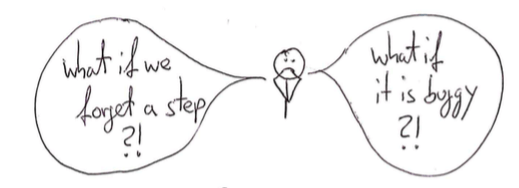
fears

Deployment needs to be a non-event, a habit. For this we need to automate every step besides the first one: clicking a button to start deployment.
deploy

On Linux we have wonderful tools for this but what if you are stuck with deploying to Windows?

brave

Fear not, brave developer! Even on Windows we can use a package manager to install and rollback buggy versions. Let me introduce you to chocolatey.

choco

Chocolatey (or choco in short) uses the common NuGet package format. Formerly developed for the .net platform we can use it for other platforms, too. In our following example we use a simple Java application which we install as a service and as a task.
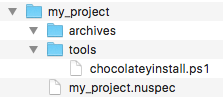
Setting up we need a directory structure for the package like this:

folders

We need to create two files: one which specifies our package (my_project.nuspec) and one script which holds the deployment steps (chocolateyinstall.ps1). The specification file holds things like the package name, the package version (which can be overwritten when building the package), some pointers to project, source and license URLs. We can configure files and directories which will be copied to the package: in our example we use a directory containing our archives (aptly named archives) and a directory containing the installation steps (named tools). Here is a simple example:

<?xml version="1.0" encoding="utf-8"?>
<!-- Do not remove this test for UTF-8: if “Ω” doesn’t appear as greek uppercase omega letter enclosed in quotation marks, you should use an editor that supports UTF-8, not this one. -->
<package xmlns="http://schemas.microsoft.com/packaging/2015/06/nuspec.xsd">
  <metadata>
    <id>my_project</id>
    <title>My Project (Install)</title>
    <version>0.1</version>
    <authors>Me</authors>
    <owners>Me</owners>
    <summary></summary>
    <description>Just an example</description>
    <projectUrl>http://localhost/my_project</projectUrl>
    <packageSourceUrl>http://localhost/git</packageSourceUrl>
    <tags>example</tags>
    <copyright>My company</copyright>
    <licenseUrl>http://localhost/license</licenseUrl>
    <requireLicenseAcceptance>false</requireLicenseAcceptance>
    <releaseNotes></releaseNotes>
  </metadata>
  <files>
    <file src="tools\**" target="tools" />
    <file src="archives\**" target="archives" />
  </files>
</package>

This file tells choco how to build the packages and what to include. For the deployment process we need a script file written in Powershell.
powershell

A Powershell primer

Powershell is not as bad as you might think. Let’s take a look at some basic Powershell syntax.

Variables

Variables are started with a $ sign. As in many other languages ‘=’ is used for assignments.

$ErrorActionPreference = 'Stop'

Strings

Strings can be used with single (‘) and double quotes (“).

$serviceName = 'My Project'
$installDir = "c:\examples"

In double quoted strings we can interpolate by using a $ directly or with curly braces.

$packageDir = "$installDir\my_project"
$packageDir = "${installDir}\my_project"

For escaping double quotes inside a double quoting string we need back ticks (`)

"schtasks /end /f /tn `"${serviceName}`" "

Multiline strings are enclosed by @”

$cmdcontent = @"
cd /d ${packageDir}
java -jar ${packageName}.jar >> output.log 2>&1
"@

Method calls

Calling methods looks a mixture of command line calls with uppercase names.

Write-Host "Stopping and deleting current version of ${packageName}"
Get-Date -format yyyyddMMhhmm
Copy-Item $installFile $packageDir

Some helpful methods are:

  • Write-Host or echo: for writing to the console
  • Get-Date: getting the current time
  • Split-Path: returning the specified part of a path
  • Join-Path: concatenating a path with a specified part
  • Start-Sleep: pause n seconds
  • Start-ChocolateyProcessAsAdmin: starting an elevated command
  • Get-Service: retrieving a Windows service
  • Remove-Item: deleting a file or directory
  • Test-Path: testing for existence of a path
  • New-Item: creating a file or directory
  • Copy-Item: copying a file or directory
  • Set-Content: creating a file with the specified contents
  • Out-Null: swallowing output
  • Resolve-Path: display the path after resolving wildcards

The pipe (|) can be used to redirect output.

Conditions

Conditions can be evaluated with if:

if ($(Get-Service "$serviceName" -ErrorAction SilentlyContinue).Status -eq "Running") {
}

-eq is used for testing equality. -ne for difference.

Deploying with Powershell

For installing our package we need to create the target directories and copy our archives:

$packageName = 'myproject'
$installDir = "c:\examples"
$packageDir = "$installDir\my_project"

Write-Host "Making sure $installDir is in place"
if (!(Test-Path -path $installDir)) {New-Item $installDir -Type Directory  | Out-Null}

Write-Host "Making sure $packageDir is in place"
if (!(Test-Path -path $packageDir)) {New-Item $packageDir -Type Directory  | Out-Null}

Write-Host "Installing ${packageName} to ${packageDir}"
Copy-Item $installFile $packageDir

When reinstalling we first need to delete existing versions:

$installDir = "c:\examples"
$packageDir = "$installDir\my_project"

if (Test-Path -path $packageDir) {
  Remove-Item -recurse $(Join-Path $packageDir "\*") -exclude *.conf, *-bak*, *-old*
}

Now we get to the meat creating a Windows service.

$installDir = "c:\examples"
$packageName = 'myproject'
$serviceName = 'My Project'
$packageDir = "$installDir\my_project"
$cmdFile = "$packageDir\$packageName.cmd"

if (!(Test-Path ($cmdFile)))
{
    $cmdcontent = @"
cd /d ${packageDir}
java -jar ${packageName}.jar >> output.log 2>&1
"@
    echo "Dropping a ${packageName}.cmd file"
    Set-Content $cmdFile $cmdcontent -Encoding ASCII -Force
}

if (!(Get-Service "${serviceName}" -ErrorAction SilentlyContinue))
{
  echo "No ${serviceName} Service detected"
  echo "Installing ${serviceName} Service"
  Start-ChocolateyProcessAsAdmin "install `"${serviceName}`" ${cmdFile}" nssm
}

Start-ChocolateyProcessAsAdmin "set `"${serviceName}`" Start SERVICE_DEMAND_START" nssm

First we need to create a command (.cmd) file which starts our java application. Installing a service calling this command file is done via a helper called nssm. We set it to starting manual because we want to start and stop it periodically with the help of a task.

For enabling a reinstall we first stop an existing service.

$installDir = "c:\examples"
$serviceName = 'My Project'
$packageDir = "$installDir\my_project"

if (Test-Path -path $packageDir) {
  Write-Host $(Get-Service "$serviceName" -ErrorAction SilentlyContinue).Status

  if ($(Get-Service "$serviceName" -ErrorAction SilentlyContinue).Status -eq "Running") {
    Start-ChocolateyProcessAsAdmin "Stop-Service `"${serviceName}`""
    Start-Sleep 2
  }
}

Next we install a task with help of the build in schtasks command.

$serviceName = 'My Project'
$installDir = "c:\examples"
$packageDir = "$installDir\my_project"
$cmdFile = "$packageDir\$packageName.cmd"

echo "Installing ${serviceName} Task"
Start-ChocolateyProcessAsAdmin "schtasks /create /f /ru system /sc hourly /st 00:30 /tn `"${serviceName}`" /tr  `"$cmdFile`""

Stopping and deleting the task enables us to reinstall.

$packageName = 'myproject'
$serviceName = 'My Project'
$installDir = "c:\examples"
$packageDir = "$installDir\my_project"

if (Test-Path -path $packageDir) {
  Write-Host "Stopping and deleting current version of ${packageName}"
  Start-ChocolateyProcessAsAdmin "schtasks /delete /f /tn `"${serviceName}`" "
  Start-Sleep 2
  Start-ChocolateyProcessAsAdmin "schtasks /end /f /tn `"${serviceName}`" "
  Remove-Item -recurse $(Join-Path $packageDir "\*") -exclude *.conf, *-bak*, *-old*
}

tl;dr

Putting it all together looks like this:

$ErrorActionPreference = 'Stop'; # stop on all errors

$packageName = 'myproject'
$serviceName = 'My Project'
$installDir = "c:\examples"
$packageDir = "$installDir\my_project"
$cmdFile = "$packageDir\$packageName.cmd"
$currentDatetime = Get-Date -format yyyyddMMhhmm
$scriptDir = "$(Split-Path -parent $MyInvocation.MyCommand.Definition)"
$installFile = (Join-Path $scriptDir -ChildPath "..\archives\$packageName.jar") | Resolve-Path


if (Test-Path -path $packageDir) {
  Write-Host "Stopping and deleting current version of ${packageName}"
  Start-ChocolateyProcessAsAdmin "schtasks /delete /f /tn `"${serviceName}`" "
  Start-Sleep 2
  Start-ChocolateyProcessAsAdmin "schtasks /end /f /tn `"${serviceName}`" "
  Remove-Item -recurse $(Join-Path $packageDir "\*") -exclude *.conf, *-bak*, *-old*

  Write-Host $(Get-Service "$serviceName" -ErrorAction SilentlyContinue).Status

  if ($(Get-Service "$serviceName" -ErrorAction SilentlyContinue).Status -eq "Running") {
    Write-Host "Stopping and deleting current version of ${packageName}"
    Start-ChocolateyProcessAsAdmin "Stop-Service `"${serviceName}`""
    Start-Sleep 2
  }

  if ($(Get-Service "$serviceName"  -ErrorAction SilentlyContinue).Status -ne "Running") {
    Write-Host "Cleaning ${packageDir} directory"
    Remove-Item -recurse $(Join-Path $packageDir "\*") -exclude *.conf, *-bak*, *-old*
  }
}
 
Write-Host "Making sure $installDir is in place"
if (!(Test-Path -path $installDir)) {New-Item $installDir -Type Directory  | Out-Null}

Write-Host "Making sure $packageDir is in place"
if (!(Test-Path -path $packageDir)) {New-Item $packageDir -Type Directory  | Out-Null}

Write-Host "Installing ${packageName} to ${packageDir}"
Copy-Item $installFile $packageDir

if (!(Test-Path ($cmdFile)))
{
    $cmdcontent = @"
cd /d ${packageDir}
java -jar ${packageName}.jar >> output.log 2>&1
"@
    echo "Dropping a ${packageName}.cmd file"
    Set-Content $cmdFile $cmdcontent -Encoding ASCII -Force
}

if (!(Get-Service "${serviceName}" -ErrorAction SilentlyContinue))
{
  echo "No ${serviceName} Service detected"
  echo "Installing ${serviceName} Service"
  Start-ChocolateyProcessAsAdmin "install `"${serviceName}`" ${cmdFile}" nssm
}

Start-ChocolateyProcessAsAdmin "set `"${serviceName}`" Start SERVICE_DEMAND_START" nssm

echo "Installing ${serviceName} Task"
Start-ChocolateyProcessAsAdmin "schtasks /create /f /ru system /sc hourly /st 00:30 /tn `"${serviceName}`" /tr  `"$cmdFile`""

Finally

Now we just need to create the package in our build script. The package will be named my_project.version.nupkg.
On our build machine we need to install choco. On the target machine we need the following tools installed:
chocolatey and nssm (for service management). Now we can create the package with:

  choco pack --version=${version}

Copy it to the target machine and install the current version with:

choco install -f -y c:\\installations\\${archive.name} --version=${version}

Put these steps inside a build script and use your favourite contininuous integration platform and voila.
Done.

deploy

A procedure to deal with big amounts of email

How can you survive the daily email flood and still keep track of your work? Here is one personal ruleset that adapts real-life habits to virtual message management.

The problem

You probably know the problem already: A day with less than 500 emails feels like your internet connection might be lost. The amount of emails you receive can accurately predict the time of day. In my case, I’ll always receive my 300th email each day right before lunch. Imagine that I’ve spent one minute for each message, then I would have done nothing but reading emails yet. And by the time I return from lunch, more emails have found their way into my inbox. My job description is not “email reader”. It actually is one of the lesser prioritized activities of my job. But I keep most answering times low and always know the content of my inbox. You’ll seldom hear “sorry, I haven’t seen your email yet” from me. How I keep the email flood in check is the topic of this blog entry. It’s my personal procedure, so nothing fancy with a big name, but you might recognize some influence from well-known approaches like “Getting Things Done” by David Allen.

The disclaimer

Disclaimer: You might entirely disagree with my approach. That’s totally acceptable. But keep in mind that it works for at least one person for a long time now, even if it doesn’t fit your style. Email processing seems to be a delicate topic, please keep your comments constructive. By the way, I’d love to hear about your approach. I’m always eager to learn and improve.

The analogy

Let me start with a common analogy: Your email inbox is like your mailbox. All letters you receive go through your mailbox. All emails you receive go through your inbox. That’s where this analogy ends and it was never useful to begin with. Your postman won’t show up every five minutes and stuff more commercial mailings, letters, postcards and post-it notes into your mailbox (raising that little flag again that indicates the presence of mail). He also won’t announce himself by ringing your door bell (every five minutes, mind you) and proclaiming the first line of three arbirtrarily chosen letters. Also, I’ve rarely seen mailboxes that contain hundreds if not thousands of letters, some read, some years old, in different states of decay. It’s a common sight for inboxes whose owners gave up on keeping up. I’ve seen high stacks of unanswered correspondence, but never in the mailbox. And this brings me to my new analogy for your email inbox: Your email inbox is like your desk. The stacks of decaying letters and magazines? Always on desks (and around it in extreme cases). The letters you answer directly? You bring them to your desk first. Your desk is usually clear of pending work documents and this should be the case for your inbox, too.

(c) Fotolia Datei: #87397590 | Urheber: thodonal

The rules

My procedure to deal with the continuous flood of e-amils is based on three rules:

  • The inbox is the only queue of emails that needs attention. It is only filled with new emails (which require activity from my side) or emails that require my attention in the foreseeable future. The inbox is therefor only filled with pending work.
  • Email processing is done manually. I look at each email once and hopefully only once. There are no automatic filters that sort emails into different queues before I’ve seen them.
  • For every email, interaction results in an activity or decision on my side. No email gets “left there”.

Let me explain the context of the rules in a bit more detail:

My email account has lots and lots of folders to store all emails until eternity. The folders are organized in a hierarchy, but that doesn’t really matter, because every folder can hold emails. The hierarchy of folders isn’t pre-planned, it emerges from the urge to group emails together. It’s possible that I move specific emails from one folder to another because the hierarchy has changed. I will use automatic filters to process emails I’ve already read. But I will mark every email as read by myself and not move unread emails around automatically. This narrows the place to look for new emails to one place: the inbox. Every other folder is only for archivation, not for processing.

The sweeps

The amount of unread emails in my inbox is the amount of work I need to do to return to the “only pending work” state. Let’s say that I opened my email reader and it shows 50 new messages in the inbox. Now I’ll have to process and archivate these 50 emails to be in the same state as before I had opened it. I usually do three separate processing steps:

  • The first sweep is to filter out any spam messages by immediate tell-tale signs. This is the only automatic filter that I’ll allow: the junk filter. To train it, I mark any remaining junk mail as spam and let the filter deal with it. I’m still not sure if the junk filter really makes it easier for me, because I need to scan through the junk regularly to “rescue” false positives (legitimate mails that were wrongfully sorted out), but the junk filter in combination with my fast spam sweep will lower the message count significally. In our example, we now have 30 mails left.
  • The second sweep picks every email that is for information purpose only. Usually those mails are sent by software tools like issue trackers, wikis, code review tools or others. Machines don’t feel the effort of writing an email, so they’ll write a lot. Most of the time, the message content is only a few lines of text. I grab each of these mails and drag them into their corresponding folder. While I’m dragging, I read (and memorize) the content of the email. The problem with this kind of information is that it’s a lot of very small chunks of data for a lot of different contexts. In order to understand those messages, you have to switch your mental context in a matter of seconds. You can do it, but only if you aren’t interrupted by different mental states. So ignore any email that requires more than a few seconds of focused attention from you. Let them sit into your inbox along with the emails that require an answer. The only activity for mails included in your second sweep is “drag to folder & memorize”. Because machines write often, we now have 10 mails left in our example.
  • The third sweep now attends to each remaining mail independently. Here, the three-minutes rule applies: If it takes less than three minutes to reply to the email right now, then do it right now and archivate the mail in a suitable folder (you might even create a new folder for it). Remember: if you’ve processed an email, it leaves the inbox. If it takes more than three minutes, you need to schedule an attention slot for this particular message on your todo-list. This is the only time the email remains in the inbox, because it’s a signal of pending work. In our example, 7 emails could be answered with short replies, but 3 require deep concentration or some more text for the answer.

After the three sweeps, only emails that indicate pending work remain in the inbox. They only leave the inbox after I’ve dealt with them. I need to schedule a timebox to work on them, but after that, they’ll find themselves out of the inbox and in a folder. As soon as an email is in a folder, I forget about its existence. I need to remember the information that were in it, but not the message itself.

The effects

While dealing with each email manually sounds painfully slow at first, it becomes routine after only a short while. The three sweeps usually take less than five minutes for 50 emails, excluding the three major correspondence tasks that make their way as individual items on my work schedule. Depending on your ratio of spam to information messages to real correspondence, your results may vary.

The big advantage of dealing manually with each email is that I’ve seen each message with my own eyes. Every email that an automatic filter grabs and hides before you can see it should not have been sent in the first place – it’s simulating a pull notification scheme (you decide when to receive it by opening the folder) rather than leveraging the push notification scheme (you need to deal with it right now, not later) that emails are inherently. Things like timelines, activity streams or message boards are pull-oriented presentations of presumably the same information, perhaps that’s what you should replace your automatically hidden emails with.

You’ll have an ever-growing archive with lots of folders for different things (think of a shelf full of document files in real life), but you’ll never look into them as long as you don’t desperately search “that one mail from 3 months ago”. You’ll also have a clean inbox, preferably in “blank slate” condition or at least with only emails that require actions from you. So you’ll have a clear overview of your pending work (the things in your inbox) and the work already done (the things  in your folders).

The epilogue

That’s when you discover that part of your work can be described as “look at each email and move it to a folder” as if you were an official in charge for virtual paper. We virtualized our paperwork, letters, desks, shelves and document files. But the procedures to deal with them is still the same.

Your turn now

How do you process your emails? What are your rules and habits? What are your experiences with folders vs. tags? I would love to hear from you – in a comment, not an email.

C++ Coroutines on Windows with the Fiber API

Last week, I had the chance to try out coroutines as a way to cooperatively interleave long tasks with event-processing. Unlike threads, where you can have interaction between between threads at any time, coroutines need to yield control explicitly, whic arguably makes synchronisation a little simpler. Especially in (legacy) systems that are not designed for concurrency. Of course, since coroutines do not run at the same time, you do not get the perks from concurrency either.

If you don’t know coroutines, think of them as functions that can be paused and resumed.

Unlike many other languages, C++ does not have built-in support for coroutines just yet. There are, however, several alternatives. On Windows, you can use the Fiber API to implement coroutines easily.

Here’s some example code of how that works:

auto coroutine=make_shared<FiberCoroutine>();
coroutine->setup([](Coroutine::Yield yield)
{
  for (int i=0; i<3; ++i)
  {
    cout << "Coroutine " 
         << i << std::endl;
    yield();
  }
});

int stepCount = 0;
while (coroutine->step())
{
  cout << "Main " 
       << stepCount++ << std::endl;
}

Somewhat surprisingly, at least if you have never seen coroutines, this will output the two outputs alternatingly:

Coroutine 0
Main 0
Coroutine 1
Main 1
Coroutine 2
Main 2

Interface

Since fibers are not the only way to implement coroutines and since we want to keep our client code nicely insulated from the windows API, there’s a pure-virtual base class as an interface:

class Coroutine
{
public:
  using Yield = std::function<void()>;
  using Run = std::function<void(Yield)>;

  virtual ~Coroutine() = default;
  virtual void setup(Run f) = 0;
  virtual bool step() = 0;
};

Typically, creation of a Coroutine type allocates all the resources it needs, while setup “primes” it with an inner “Run” function that can use an implementation-specific “Yield” function to pass control back to the caller, which is whoever calls step.

Implementation

The implementation using fibers is fairly straight-forward:

class FiberCoroutine
  : public Coroutine
{
public:
  FiberCoroutine()
  : mCurrent(nullptr), mRunning(false)
  {
  }

  ~FiberCoroutine()
  {
    if (mCurrent)
      DeleteFiber(mCurrent);
  }

  void setup(Run f) override
  {
    if (!mMain)
    {
      mMain = ConvertThreadToFiber(NULL);
    }
    mRunning = true;
    mFunction = std::move(f);

    if (!mCurrent)
    {
      mCurrent = CreateFiber(0,
        &FiberCoroutine::proc, this);
    }
  }

  bool step() override
  {
    SwitchToFiber(mCurrent);
    return mRunning;
  }

  void yield()
  {
    SwitchToFiber(mMain);
  }

private:
  void run()
  {
    while (true)
    {
      mFunction([this]
                { yield(); });
      mRunning = false;
      yield();
    }
  }

  static VOID WINAPI proc(LPVOID data)
  {
    reinterpret_cast<FiberCoroutine*>(data)->run();
  }

  static LPVOID mMain;
  LPVOID mCurrent;
  bool mRunning;
  Run mFunction;
};

LPVOID FiberCoroutine::mMain = nullptr;

The idea here is that the caller and the callee are both fibers: lightweight threads without concurrency. Running the coroutine switches to the callee’s, the run function’s, fiber. Yielding switches back to the caller. Note that it is currently assumed that all callers are from the same thread, since each thread that participates in the switching needs to be converted to a fiber initially, even the caller. The current version only keeps the fiber for the initial thread in a single static variable. However, it should be possible to support this by replacing the single static fiber pointer with a map that maps each thread to its associated fiber.

Note that you cannot return from the fiberproc – that will just terminate the whole thread! Instead, just yield back to the caller and either re-use or destroy the fiber.

Assessment

Fiber-based coroutines are a nice and efficient way to model non-linear control-flow explicitly, but they do not come without downsides. For example, while this example worked flawlessly when compiled with visual studio, Cygwin just terminates without even an error. If you’re used to working with the visual studio debugger, it may surprise you that the caller gets hidden completely while you’re in the run function. The run functions stack completely replaces the callers stack until you call yield(). This means that you cannot find out who called step(). On the other hand, if you’re actually doing a lot of processing in the run function, this is quite nice for profiling, as the “processing” call tree seemingly has its own root in the call-tree.

I just wish the visual studio debugger had a way to view the states of the different fibers like it has for threads.

Alternatives

  • On Linux, you can use the ucontext.
  • Visual Studio 2015 also has another, newer, implementation.
  • Coroutines can be implemented using threads and condition-variables.
  • There’s also Boost.Coroutine, if you need an independent implementation of the concept. From what I gather, they only use Fibers optionally, and otherwise do the required “trickery” themselves. Maybe this even keeps the caller-stack visible – it is certainly worth exploring.
  • Using passwords with Jenkins CI server

    For many of our projects the Jenkins continuous integration (CI) server is one important cornerstone. The well known “works on my machine” means nothing in our company. Only code in repositories and built, tested and packaged by our CI servers counts. In addition to building, testing, analyzing and packaging our projects we use CI jobs for deployment and supervision, too. In such jobs you often need some sort of credentials like username/password or public/private keys.

    If you are using username/password they do not only appear in the job configuration but also in the console build logs. In most cases this is undesirable but luckily there is an easy way around it: using the Environment Injector Plugin.

    In the plugin you can “inject passwords to the build as environment variables” for use in your commands and scripts.inject-passwords-configuration

    The nice thing about this is that the passwords are not only masked in the job configuration (like above) but also in the console logs of the builds!inject-passwords-console-log

    Another alternative doing mostly the same is the Credentials Binding Plugin.

    There is a lot more to explore when it comes to authentication and credential management in Jenkins as you can define credentials at the global level, use public/private key pairs and ssh agents, connect to a LDAP database and much more. Just do not sit back and provide security related stuff plaintext in job configurations or your deployments scripts!