Running Tango-Servers in Docker

Containers are a great way of running your software in an environment that you defined and no one else needs to maintain of even know about. This is especially true if your software provides its service using a network port. All that operators have to provide is the execution platform for the container and the required resources.

Tango servers fit quite well into this type of software: Essentially they provide a service over the network. Unfortunately, they need a tango control system to be fully usable, so thats some other services. Luckily, there are docker images for this so building a stack of containers to run your Tango server in the scope of a control system is quite easy (sample docker-compose.yml):

version: '3.7'
services:
  my-tango-server:
    container_name: my-tango-server
    image: my-ts
    environment:
      - TANGO_HOST=tango-cs:10000
    depends_on:
      - tango-cs
  tango-cs:
    container_name: tango-database
    image: tangocs/tango-cs:9.3.2-alpha.1-no-tango-test
    ports:
      - "10000:10000"
    environment:
      - TANGO_HOST=localhost:10000
      - MYSQL_HOST=tango-db:3306
      - MYSQL_USER=tango
      - MYSQL_PASSWORD=tango
      - MYSQL_DATABASE=tango
    links:
      - "tango-db:localhost"
    depends_on:
      - tango-db
  tango-db:
    container_name: mysql-database
    image: tangocs/mysql:9.2.2
    environment:
      - MYSQL_ROOT_PASSWORD=root
    volumes:
      - tango_mysql_data:/var/lib/mysql
volumes:
  tango_mysql_data:

Example Dockerfile for the image my-ts used for the my-tango-server container:

FROM debian:buster

WORKDIR /tango-server
COPY ./my-tango-server .

RUN DEBIAN_FRONTEND=noninteractive apt-get install -y ./*.deb

CMD my-tango-server myts

Unfortunately this naive approach has the following issues:

  • The network port of our tango server changes with each restart and is not available from outside the docker stack
  • The tango server communicates the internal IP-Address of its container to the tango database so connection attempts from the outside fail even if the port is correct
  • Even though the tango server container depends on the tango control system container the tango server might start up before the tango control system is available.

Let us tackle the issues one by one.

Expose a fixed port for the Tango server

This is probably the easiest issue to fix because it is well documented for OmniORB and widely used. So let us change docker-compose.yml to expose a port and pass it into the container as an environment variable:

version: '3.7'
services:
  my-tango-server:
    container_name: my-tango-server
    image: my-ts
    ports:
      - "45450:45450"
   environment:
      - TANGO_HOST=tango-cs:10000
      - TANGO_SERVER_PORT=45450
    depends_on:
      - tango-cs
  tango-cs:
 ...

And use it in our Dockerfile for the my-ts image:

FROM debian:buster

WORKDIR /tango-server
COPY ./my-tango-server .

RUN DEBIAN_FRONTEND=noninteractive apt-get install -y ./*.deb

CMD my-tango-server myts -ORBendPoint giop:tcp::$TANGO_SERVER_PORT

Fine, now our Tango server always listens on a defined port and that same port is exposed to the outside of our docker stack.

Publish the correct IP/hostname of the Tango server

I found it hard to find documentation about this and how to put it on the command line correctly but here is the solution to the problem. The crucial command line parameter is -ORBendPointPublish . We need to pass a hostname of the host machine into the container and let OmniORB publish that name (tango-server.local in our example):

version: '3.7'
services:
  my-tango-server:
    container_name: my-tango-server
    image: my-ts
    ports:
      - "45450:45450"
   environment:
      - TANGO_HOST=tango-cs:10000
      - TANGO_SERVER_PORT=45450
      - TANGO_SERVER_PUBLISH=tango-server.local:45450
    depends_on:
      - tango-cs
  tango-cs:
 ...

And the corresponding changes to our Dockerfile:

FROM debian:buster

WORKDIR /tango-server
COPY ./my-tango-server .

RUN DEBIAN_FRONTEND=noninteractive apt-get install -y ./*.deb

CMD my-tango-server myts -ORBendPoint giop:tcp::$TANGO_SERVER_PORT -ORBendPointPublish giop:tcp:$TANGO_SERVER_PUBLISH

Waiting for availability of a service

This one is not specific to our tango server and the whole stack but a general problem when building stacks where one service depends on another one being up and listening on a network port. Docker compose takes care of the startup order of the containers but does not check for the readiness of services running in the containers. In linux containers this can easily be achieved by using the small shell utility wait-for-it. Here we only need to make some changes to our Dockerfile:

FROM debian:buster
RUN DEBIAN_FRONTEND=noninteractive apt-get update && apt-get install wait-for-it

WORKDIR /tango-server
COPY ./my-tango-server .

RUN DEBIAN_FRONTEND=noninteractive apt-get install -y ./*.deb

CMD wait-for-it $TANGO_HOST -- my-tango-server myts -ORBendPoint giop:tcp::$TANGO_SERVER_PORT -ORBendPointPublish giop:tcp:$TANGO_SERVER_PUBLISH

Depending on your distribution/base image installation of the tool (or other similar alternatives like dockerize or docker-compose-wait).

Summing it up

After moving some rocks out of the way it is dead easy to deploy your tango servers together with a complete tango control system to any host platform providing a container runtime. You do not need to delivery everything in one single stack if you do not want to. Most of the stuff described above works the same when deploying tango control system and tango servers in independent stacks or as separate containers even on multiple hosts.

The IT architect, Part I: Map your assets

When I’m tasked with commenting on a software architecture, my first step is to request or draw a map of all distinguishable elements of the software system and give them relationships to each other. This inevitably results in a boxes-and-arrows type of diagram that serves as a base for all future communication about the subject. Having a shared representation about a system is a great way to pinpoint discussions and focus on a particular area without forgetting the rest completely.

When I’m tasked with commenting on IT infrastructure, my first step is to request or draw a map of all distinguishable elements of the IT architecture (or “IT landscape”, a term that I actually prefer because it conveys better that a lot of things on this scale happen unplanned) and give them relationships to each other. Once again, we are drawing boxes and connecting them with arrows.

Being able to rely on this map is an essential base for all communication about IT architecture. And if you know how to read the map, it directs your efforts of consolidating your IT architecture nearly intuitively.

In this blog entry, we talk about drawing the map. The second part goes into interpretation of the map, the third part emphasizes actionable steps based on the map and our interpretation of it. Based on questions and discussion, there might even be a fourth part, but that’s not planned yet.

Your initial boxes

Beginning the IT architecture map is easy: Draw a box and give it a name. The name should correspond to an element of your work environment that is distinguishable from other elements. Note how I don’t say “system” or “service” or “server”. For an IT architecture, these words describe an implementation, a particular manifestation of the architecture. They don’t belong on the map (or this map). If you cannot see the difference yet, think about the floor plan of a house. It doesn’t tell you about the material the house is made of and you can use the same floor plan for a wooden cabin or a marble mansion (barring some pesky statics limitations that I don’t have a clue of). In our IT architecture map, each box represents a “thing” that will at the latest get a name the minute it stops working.

There will be boxes in your IT architecture map that don’t relate to anything else. That’s fine and not a problem, as long as the box relates to humans. If you cannot find a meaningful relationship between the box and humans or other boxes, you’ve found a relict. This is in fact one of the hardest tasks in IT architecture analysis, so congratulations!

Adding relationships

Every other box interacts with its environment in some manner. Again, the concrete implementation of that interaction is not important for our map. For our current view on the landscape, it makes no difference if a software system uses HTTP calls to a server or a computer tranfers bytes over RS232 wire to an appliance box. The fact that one box relies on the availability of another box is all that matters. That’s the essence of our arrows: Box 1 requires box 2 to be “online” in order to perform its duties. Without box 2, the functionality offered by box 1 will be limited, down to a point where it is no longer useful to others. Our arrows denote dependencies between boxes. If you happen to be a software developer: we don’t talk about code dependencies here. Also, even if closely related, we don’t mean format or protocol dependencies. We just state that if box 2 “goes down”, box 1 will follow closely.

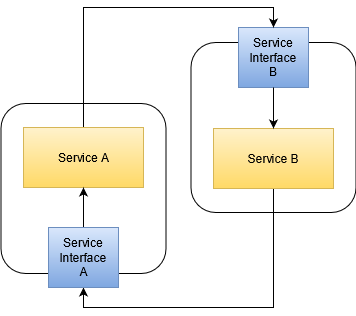
This is the base for a rule of thumb about dependency arrows: Don’t draw them bidirectionally. Each arrow has one clear direction (like box 1 –> box 2). If you find that box 2 also depends on box 1, you should draw two arrows in opposite directions. As a preview for the interpretation step: This dependency cycle is a sore spot in your current architecture. It means that your two boxes appear as one to the outside. It means that you cannot replace one part without the other. The replaceability of single boxes is an important aspect of your landscape’s health.

Making it readable

When you’ve placed your boxes and drawn the arrows, it’s time to improve on the map’s layout. A guideline for the layout is that arrows shouldn’t intersect each other. Another guideline is that boxes that are semantically related should be near each other on the map. These two requirements alone often result in a lot of movement and experiments. You might want to use a software that allows for these experiments without much effort.

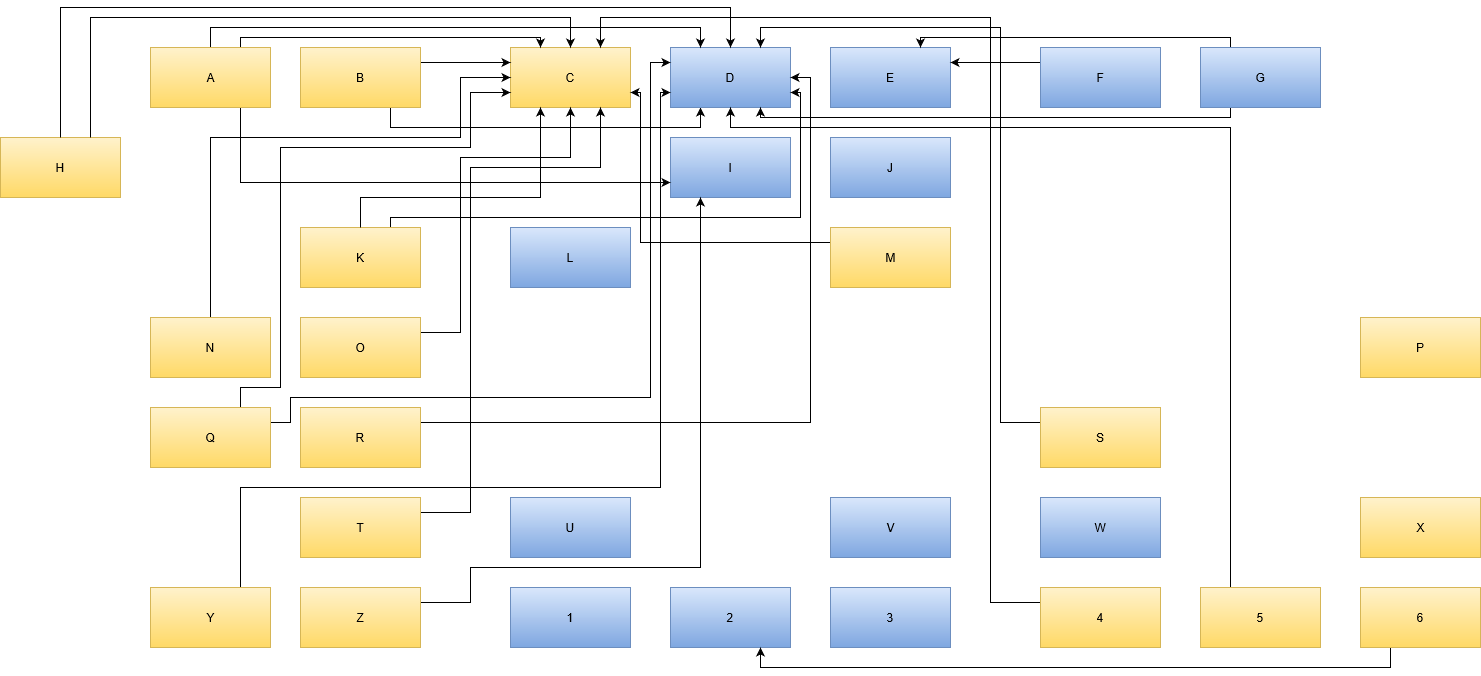
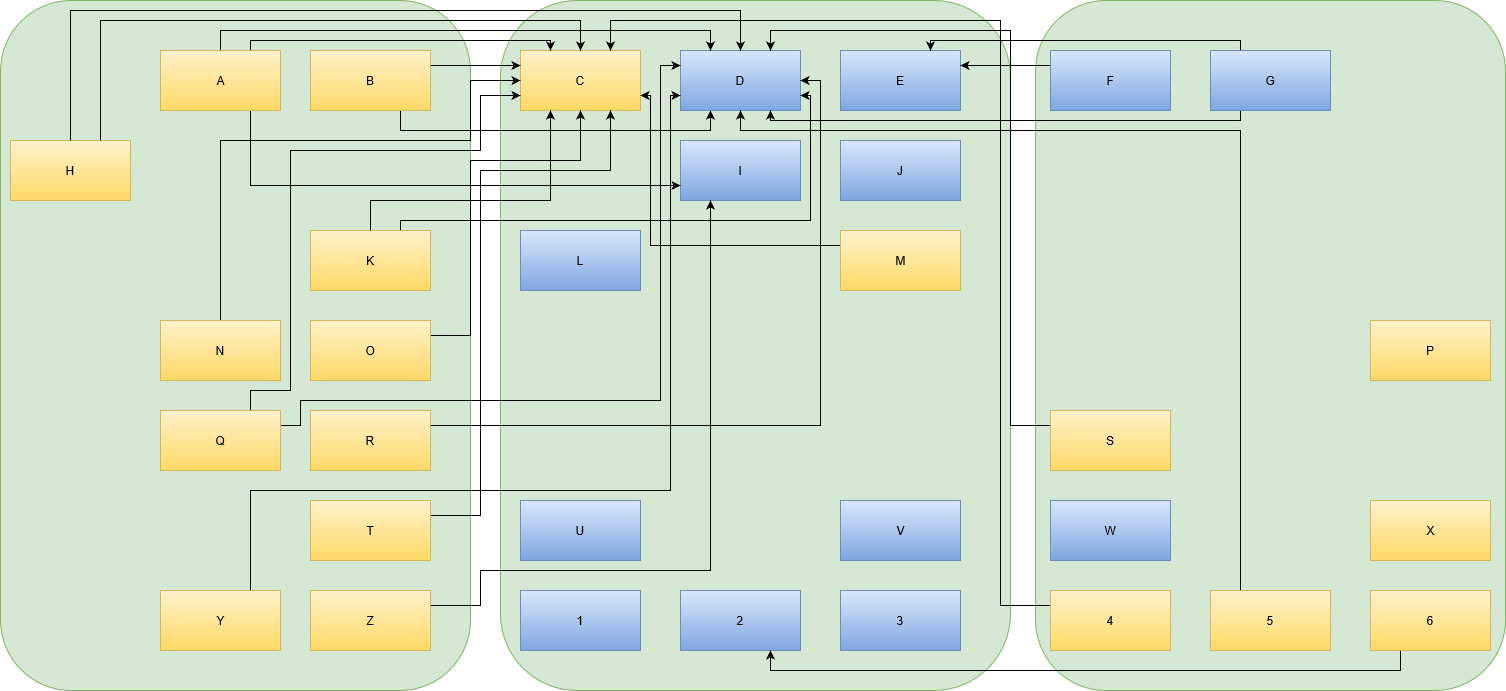
You’ll recognize a fitting layout when you see it. The map corresponds to your internal landscape representation enough to be useful in discussions. It might look like this real example:

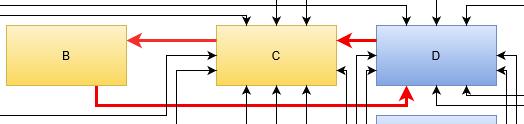
First thing you’ll notice it that the names are replaced by denotations with zero meaning. In a real map, the box “C” might be named “time tracking” and box “D” could be labelled “issue tracking”. The name should indicate the responsibility of the element/box. You can also add the current implementation of that responsibility, if that makes things clearer. In our example, box “D”, indicating “issue tracking” might have “(JIRA)” added to the description. Just be aware that your organization probably needs another issue tracking system in that place even if JIRA falls out of favour. Following your arrows backwards, you’ll know which other elements of your landscape will be affected by this replacement. More on that in the next part about interpreting the map.

Evolving the map

Another thing you probably scoffed at is the intersecting arrows in the example. The map’s author came up with this layout as the best representation when the map had fewer boxes. With each subsequently added box, another arrow or two tried to reach the “center”. The intersections are a direct consequence of the emergence of a “center”. This is an important finding of your map: Being able to identify your map’s center and deduce meaning from it. To spoiler a bit: If your center is “time tracking” and “issue tracking”, you probably charge money per hour to solve other people’s problems.

Conclusion

You’ve probably seen how drawing an IT landscape map can benefit your organization and your discussions about its present and future. One thing you should keep in mind is that the map should reflect the current state and not your desired state of your organization’s IT architecture. That’s what will be addressed in part 3 of this series. Stay tuned!

Want to read more? Head over to part II of this series.

return first

Let me introduce the “return first” method. Fear not, this is not a treatise on guard-clauses. It is, however, both a code design approach and a refactoring method. It starts with a simple question to ask yourself whenever you want to call a function:

Can I return first?

That’s supposed to be catchy, but it is probably not terribly enlightening. Let me demonstrate with an example. I’ll be using C++, but I dare say that this method can be used in all imperative languages.

void process_all(
  std::vector<input_info_t>& input_list,
  context_t const& context,
  target_t const& target)
{
  for (auto& each : input_list)
  {
    if (some_filter_applies(each, context))
    {
      hand_off_to(each, target);
      continue;
    }

    process_one(each, context);
    hand_off_to(each, target);
  }
}

For the sake of this example, the three functions some_filter_applies, process_one and hand_off_to are immutable. Let us try to improve process_all by extracting a function:

void maybe_process_and_hand_off(
  input_info_t& input,
  context_t const& context,
  target_t const& target)
{
  if (some_filter_applies(input, context))
  {
    hand_off_to(input, target);
    return;
  }

  process_one(input, context);
  hand_off_to(input, target);
}

void process_all(
  std::vector<input_info_t>& input_list,
  context_t const& context,
  target_t const& target)
{
  for (auto& each : input_list)
  {
    maybe_process_and_hand_off(each, context, target);
  }
}

So what do we have now:

  1. 26 instead of 17 lines. 22 instead of 13 if we do not count lines with just braces, a 70% increase.
  2. A pretty clumsy name for the function called in the loop. Can you do better?
  3. We have to pass the target all the way to hand_off_to without really using it directly in maybe_process_and_hand_off.
  4. The complexity is more or less the same.

So that was not great. So let us try to use return first and focus on hand_off_to. What if instead of calling hand_off_to, we just return first, and then do it? In this case, it’s pretty easy, since hand_off_to is a tail-call in each case:

void maybe_process(
  input_info_t& input,
  context_t const& context)
{
  if (some_filter_applies(input, context))
  {
    return;
  }

  process_one(input, context);
}

void process_all(
  std::vector<input_info_t>& input_list,
  context_t const& context,
  target_t const& target)
{
  for (auto& each : input_list)
  {
    maybe_process(each, context);
    hand_off_to(each, target);
  }
}

Now we no longer have to pass target through a function that does not need it, which makes both the call site and the function declaration simpler. Now a few more other refactorings are available. Let’s assume some_filter_applies is pure and process_one only changes its input parameter, as the signatures suggest. We can use loop fission, and inline the function again:

void process_all(
  std::vector<input_info_t>& input_list,
  context_t const& context,
  target_t const& target)
{
  for (auto& each : input_list)
  {
    if (some_filter_applies(each, context))
    {
      continue;
    }

    process_one(each, context);
  }
  for (auto const& each : input_list)
  {
    hand_off_to(each, target);
  }
}

“return first” actually works for all control structures, not just functions. So in this case we returned from the first loop before starting to call hand_off_to multiple times. Often times, the code will not be as easy to refactor, because there is actually some data flowing between the function we’re in and the one we’re calling. The simple solution then is to pack all the parameters into a struct and return that, aka using data as the interface instead.

void hand_off_individually(
  std::vector<input_info_t>& input_list)
{
  for (auto& each : input_list)
  {
    auto target = compute_target(each);
    if (!target.valid())
      continue;

    hand_off_to(each, target);
  }
}

That be turned into this:

void hand_off_individually(
  std::vector<input_info_t> const& input_list)
{
  struct targeted
  {
    input_info_t info;
    target_t target;
  };
  std::vector<targeted> valid;
  for (auto const& each : input_list)
  {
    auto target = compute_target(each);
    if (!target.valid())
      continue;
    valid.push_back({each, target});
  }

  for (auto const& each : valid)
  {
    hand_off_to(each.info, each.target);
  }
}

This is definitely longer, and probably not worth the hassle for this contrived example – this is more to show how to do it, not that is is effective.

Evaluation

In real programs, this applying “return first” is often worthwhile. It makes the code flow “wider instead of deeper”, which is often easier to follow, especially if you try to debug or measure/profile your code. It is also a gold-recipe to enable batching, which is curcial whenever you’re dealing with latency, e.g. when using RAM or building web requests. Have you tried this technique before? Do you, maybe, know it by another name? Do tell!

Windows 10 quality of life features

Starting with Windows 10 Microsoft switched from big-bang releases of its operating system to so called rolling releases: They release new features and improvements in regular intervals – once or twice a year – without changing the product name.

The great thing is that users get the improvements made by Microsofts engineers much sooner than in the past where you had to wait several years for a big “service pack” to arrive or even a new major release of Windows like 2000, XP, Vista, 7, 8, 8.1 and finally 10 (I am leaving out the dark times on purpose 😉).

The bad thing is that it is harder to see what version or release you are running. Of course there is a (less visible) name for every Windows release. This version or codename sometimes gets mentioned on support pages or in blog posts because functionality of Window 10 can change significantly between these rolling feature updates. And sometimes you may run some app or tool that tells you need Windows 10 2004 or higher.

What version of Window 10 am I running?

I know of two simple ways to find out what version of Windows 10 you are running currently:

  1. Running the tool winver
  2. Opening the Settings -> System -> Info page

Why does it matter?

Another downside is that users often are not aware of new stuff added to their operating system. And Microsoft does an awful job promoting the changes and improvements!

Of course there are announcements about the big things after upgrading your operating system to the next feature level. And Microsoft uses these for marketing its own apps and services. They slap you their new Edge-browser in the face on every occasion and try to trick you in creating a Microsoft account. It is absolutely not obvious how to use Windows without a Microsoft account like the decades before. Skip the process here, continue without and risk your live…

On the other hand they really improve their software and slowly but steadily round the rough edges of their system. The UIs for environment variables are finally quite usable.

Now back to the main theme of the post: There are some hidden gems built into Windows 10 that I learned of only lately and I think are vastly underadvertised – unlike Microsoft’s marketing of their big products.

Built-in screen recorder

Ok, many gamers may know it because it Windows briefly displays the shortcut Win+G when starting a game. It is not only usable for games but you can record any window, capture application sounds and record your voice. You can easily record your own screencasts and video tutorials using this built-in solution.

Built-in clipboard manager

How often did you wish to be able copy multiple items and choose one of the last few copied elements when pasting? While such clipboard managers have been around for a long time and sometimes provide tons of useful features Windows 10 has a simple one built-in. Just press Win+V instead of Ctrl+V to paste your clipboard entry and you will get a list of the copied items to choose from.

Built-in screenshot/snipping tool

Many people may know the old way of making screenshots using the oddly labeled PrtScr-key (sometimes also PrntScrn or simply Print), opening a painting application like MS paint and pasting the image using Ctrl+V. Well, Microsoft improved this workflow a lot by including a snipping tool that you can activate using Win+Shift+S. This tool lets you select either a rectangular or free-form region, a window or an entire screen to capture. After doing that you get a notification allowing you to make modifications to the capture and save it to disk.

On-screen emoji-keyboard

Just a little helper in these modern social media times is the on-screen emoji-keyboard. Using Win+. you can activate it, browse tons of common emojis and enter them into you messages and texts 🐱‍🏍🤘.

Windows Terminal

Ok, this last but not least one is not (yet) built-in and mostly interesting for developers and power users. Nevertheless, I think it is noteworthy that Microsoft finally built a capable terminal application with modern features like multiple tabs, full unicode and font support, customizable background with blur and the ability to host different shells like the old and trusted command prompt CMD, the newer PowerShell and WSL. You can find it in the Microsoft store for free.

Conclusion

While releases of Windows 10 are more subtle than past new Windows releases many things change both under the hood and user visible. Every once in a while something you missed for years or installed third-party tools for may be added without you knowing. That’s another reason why talking to colleagues and friends and practices like pair-programming and brown-bag meetings are so valuable for sharing knowledge and experience.

I hope there is something for you in my findings of hidden windows gems. If you have some Windows 10 features you discovered and really like, feel free to leave them in the comments. I will gladly try them out!

The spell that reveals your onboarding decade

Every one of us has started somewhere. By telling you what my first computer was, I also convey a lot about the place and time my journey in IT started. For many of my fellows, it was a Commodore C64 or an Atari 500. But even if I don’t tell you about my first machine, there is a simple “magic spell” that you can cast to at least get a hint about the decade my first working days started, 15 years after my first contact with computers.

The spell is just one word: “container”. What a container is and how to use it is bound to the decades. Let me guide you through some typical answers.

Pre-2010 answer

If you entered the industry around the year 2000, a container was a big chunk of software that you preferably installed on an even bigger machine, the infamous “application server”. The container, or “servlet container”, “application container”, or, if you were with the right folks, “enterprise bean container” (in short: EJB-Container) was the central hub to host all of your web applications. If you deployed your application into the container, it handled the rest, like unpacking the web archive, providing resources and publishing to the internet. Typical names of containers were Tomcat, Jetty, JBoss or WildFly. You can probably see them around even today, because the concept itself is appealing. Some aspects of it inevitably lead to problems, though. Resource management was a big topic. Your application wasn’t expected to care for a database connection, a logging context or, sometimes, even security features, because the container provided those things to it. As you can probably imagine, that left your application crippled and unable to function outside a container.

Pre-2010 containers

So if you onboarded more than ten years ago, your first thoughts reacting to the word “container” will be “big machine”, “slow startup” and “logging framework”. There cannot reasonably be more than one container per machine. Maintaining a cluster of containers would be the work of luminaries. Being asked to start a container on your developer machine is a dreadful endeavour. “Booting the container” is a reason to visit the coffee machine.

Post-2010 answer

But if you started your career less than ten years ago, your reaction to the word “container” will be different. Starting in 2013, a technology named “Docker” reinvented an old practice to isolate processes and package them into a transport format. Simplified enough, a container is just the RAM-based projection of an application image. You boot a container by loading the image into RAM. That’s some of the fastest things you can do on a computer (not really, but it fits the story better). Even better, because each container ideally contains just one small application or part of it, you don’t boot one container per machine, you can run dozens at the same time. Each container brings everything it needs with it and only relies on three common external resources being provided: Networking, persistent storage and a facility to dump logging output.

Post-2010 containers

It is good practice to partition your application into several containers of the post-2010 kind. It is good practice to have them talk to each other over network, either real or simulated. The lines between actual computers get blurry real fast with this kind of containering.

As a youngster, your first thoughts reacting to the word “container” will be “just one?”, “scale up” and “log output management”. You see an opportunity to maintain a cluster of containers. Being asked to start a container on your developer machine is a no-brainer. “Booting the container” is a reason to automate your container infrastructure.

The reactions to the word “container” are very different, based on socialization period. In the old days, pre-2010 containers were boss fight adversaries. Nowadays, post-2010 containers are helpful spirits that just need to be controlled.

Post-2020 answer?

What better way to control the helpful spirits but to deploy them to an environment that handles unpacking, wiring, providing resources and publishing to the internet? Your application isn’t expected to care for topics like scalability, cluster robustness or load balancing. The environment, your container cluster platform, handles those things for you. There can only be one cluster platform per cloud. Being asked to start a cluster platform on your developer machine – well, that’s just not possible, sorry. Best we can do is a minified version of it. Our applications tend to function poorly outside a cluster platform.

As you hopefully can see, developers of all decades crave a thing they tend to call “container” that they can throw their software into to have it perform well without all the hassle of operations. But as soon as they give away responsibility for the environment, they also give away the possibility of comfortable “developer machine” operations. The goal is the same, just the technicality what exactly a “container” happens to be changes over time.

What is your “spell” that reveals a lot about the responder?

React for the algebra enthusiast – Part 2

In Part 1, I explained how algebra can shed some light on a quite restricted class of react-apps. Today, I will lift one of the restrictions. This step needs a new kind of algebraic structure:

Categories

Category theory is a large branch of pure mathematics, with many facets and applications. Most of the latter are internal to pure mathematics. Since I have a very special application in mind, I will give you a definition which is less general than the most common ones.

Categories can be thought of as generalized monoids. At the same time, a Category is a labelled, directed multigraph with some extra structure. Here is a picture of a labelled directed multigraph – its nodes are labelled with upper case letters and its edges are labelled with lower case letters:

If such a graph happens to be a category, the nodes are called objects and the edges morphisms. The idea is, that the objects are changed or morphed into other objects by the morphisms. We will write h:A\to B for a morphism from object A to object B.

But I said something about extra structure and that categories generalize monoids. This extra structure is essentially a monoid structure on the morphisms of a category, except that there is a unit for each object called identity and the operation “\_\circ\_” can only be applied to morphisms, if they form “a line”. For example, if we have morphisms like k and i in the picture below, in a category, there will be a new morphism “k\circ i“:

Note that “i” is on the right in “k\circ i” but it is the first morphism if you follow the direction indicated by the arrows. This comes from function composition in mathematics, which suffers from the same weirdness by some historical accident. For now that just means that chains of morphisms have to be read from right to left to make sense of them.

For the indentities and the operation “\_\circ\_“, we can ask for the same laws to hold as in a monoid, which will complete the definition of a category:

Definition (not as general as it could be…)

A category consists of the following data:

  • A set of objects A,B,…
  • A set of morphisms f : A_1\to B_1, g:A_2\to B_2,\dots
  • An operation “\_\circ\_” which for all (consecutive) pairs of morphisms f:A\to B and g:B\to C returns a morphism g \circ f : A \to C
  • For any object a morphism \mathrm{id}_A : A\to A

Such that the following laws hold:

  • \_\circ\_ ” is associative: For all morphisms f : A \to B, g : B\to C and h : C\to D, we have: h \circ (g \circ f) = (h \circ g) \circ f
  • The identities are left and right neutral: For all morphisms f: A\to B we have: f \circ \mathrm{id}_A=\mathrm{id}_B \circ f

Examples

Before we go to our example of interest, let us look at some examples:

  • Any monoid is a category with one object O and for each element m of the monoid a morphism m:O\to O. “m\circ n” is defined to be m\cdot n.
  • The graph below can be extended to a category by adding the morhpisms ef: B\to B, fe: A\to A, efe: A\to B, fef: B\to A, \dots and an identity for A and B. The operation “\_\circ\_” is defined as juxtaposition, where we treat the identities as empty sequences. So for example, ef\circ efe is efefe: A\to B.
  • More generally: Let G be a labelled directed graph with edges e_1,\dots,e_r and nodes n_1,\dots,n_l. Then there is a category C_G with objects n_1,\dots,n_l and morphisms all sequences of consectutive edges – including the empty sequence for any node.

Action Categories

So let’s generalize Part 1 with our new tool. Our new scope are react-apps, which have actions without parameters, but now, action can not neccessarily be applied in any order. If an action can be fired, may now depend on the state of the app.

The smallest example I can think of, where we can see whats new, is an app with two states, let’s call them ON and OFF and two actions, let’s say SWITCH_ON and SWITCH_OFF:

Let us also say, that the action SWITCH_ON can only be fired in state OFF and SWITCH_OFF only in state ON. The category for that graph has as its morphims the possible sequences of actions. Now, if we follow the path of part 1, the obvious next step is to say that SWITCH_ON after SWITCH_OFF (and the other way around) is the same as the empty action-sequence — which leads us to…

Quotients

We made a pretty hefty generalization from monoids to categories, but the theory for quotients remains essentially the same. As we defined equivalence relations on the elements of a monoid, we can define equivalence relations on the morphisms of a category. As last time, this is problematic in general, but turns out to just work if we replace sequences of morphisms in the action category with matching source and target.

So in the example above, it is ok to say that SWITCH_ON SWITCH_OFF is the empty sequence on ON and SWITCH_OFF SWITCH_ON is the empty sequence on OFF (keep in mind that the first action to be executed is on the right). Then any action sequence can be reduced to simply SWITCH_ON, SWITCH_OFF or an empty sequence (not the empty sequence, because we have two of them with different source and target). And in this case, the quotient category will be what we drew above, but as a category.

Of course, this is not an example where any high-powered math is needed to get any insights. So far, these posts where just about understanding how the math works. For the next part of this series, my plan is to show how existing tools can be used to calculate larger examples.

3 good uses for the C++ preprocessor in 2020

As this weird year, 2020, comes to a close, I noticed that I am still using the preprocessor in my C++ programs. And not just for #includes which might, at last, slowly fade away with C++20’s modules. The preprocessor’s got a pretty bad rep, and new C++ programmers are usually taught to stay as far away as possible. Justifiably so – some things, like the dreaded X-Macros really should go the way of the dinosaurs.

But there are still some good uses left in the thing, and here’s my top 3 of those:

0. Commenting out big-chunks of code

I’ve often seen people comment out big parts of code with block comments: /* this is not active */. However, that will only work as long as the code does not contain any other block comments, let alone a stray */ in a string. A great alternative is to use the preprocessor:

#if 0
auto i_do_not_want_to_compile_this() -> auto
{
  std::vector<std::deque<std::mutex>> baz{};
  return baz;
}
#endif

This can easiely by wrapped multiple times around bigger parts of code, which is very helpful when refactoring large chunks of legacy code. It can very easiely be toggled on and off while in this state. And the IDE will usually still show a dimmed version of syntax highlighting in the disabled region.

1. Conditionally throw away “cross-cutting” concerns

Some parts of aspects of programs can be “cross-cutting”, which means they cannot easiely be separated from the rest of the code-base by putting them in a separate module. The most prominent example is probably logging. While you can typically modularize the actual implementation, the actual log calls will be all over your code. Another of those concerns is “profiling”. This is also something that you typically want to take out of your application when deploying it, because users will rarely profile the end-product. Again, the preprocessor comes to the rescue. For example, in the excellent Optick, most of the code you insert is actually macros that can be completely eliminated with a simple compile-time switch. Consider this “tag” that add some additional metric to your profile:

OPTICK_TAG("CoolMetric", compute_cool_metric());

When Optick is turned off via the aforementioned compile-time switch, compute_cool_metric() is never called. The call is not even compiled. Just turning Optick off will completely remove it from your source. Now this can be potentially dangerous, if the function has a side effect, but you wouldn’t do that anyways, would you?

2. Making forward declarations more visible

Presumably owing to its history as a continuously-evolved language, C++ has a very limited set of reserved keywords, often avoiding to introduce keywords to not interfere with any working software out there. Do not get me wrong, that is a great reason. But because of this, some language constructs can sometimes be a bit cryptic, for example forward declarations: class will_be_defined;. If you ever worked with a big, old or big and old code-base with lots of those, you probably know that maintaining them can be a bit of a chore and prone to error. So I think it is a great idea to at least make them more visible with your own macro “KEYWORD”:

#define FORWARD_DECL(x) class x

FORWARD_DECL(will_be_defined);

That FORWARD_DECL immediatly stands out visually and helps me keep track of those subtle declarations.

Grammar as a leaky abstraction

Internationalisation, or i18n for short, is the process of making the user interface of a program ready for translation into multiple languages. This usually means to factor out texts from the program source code into separate files, often called translation bundles. These files have a key-value structure. The program code then only refers to keys that are resolved into the actual texts from the translation bundle for the selected target language.

Here’s a simple example of two translation bundles, one for English and one for German:

# translations_en.properties
quit_confirm_message=Do you really want to quit?
yes_option=Yes
no_option=No
# translations_de.properties
quit_confirm_message=Wollen Sie die Anwendung wirklich beenden?
yes_option=Ja
no_option=Nein

The actual source code might look like this:

var answer = showDialog(
  t("quit_confirm_message"),
  t("yes_option"),
  t("no_option")
);

Here the function t looks up the key in the currently active translation bundle and returns the translated message as a string.

How not to do it

Last month I discovered an amusing attempt at internationalisation in a third-party code base. It looked similar to this:

# translations_en.properties
a=A
an=An
is=is
not=not
available=available
article=article
# translations_de.properties
a=Ein
an=Ein
is=ist
not=nicht
available=verfügbar
article=Artikel

These translation keys were used like this:

"${t('an')} ${t('article')} ${t('is')}
${available ? '' : t('not')} ${t('available')}."

to produce messages like

"An article is available."
"An article is not available."

… or in German:

"Ein Artikel ist verfügbar."
"Ein Artikel ist nicht verfügbar."

Why is this a clumsy attempt at internationalisation?

Because it uses single words as translation units, and it relies on the fact that English and German have the same sentence structure in this particular case. In general, of course, languages do not have the same sentence structure, not even related languages like English and German.

The author of the code also introduced separate translation keys for “a” and “an”. The German translation for both keys was “ein”. The author was lucky so far that all texts with “a” or “an” in this particular program translated to “ein” in German, not “eine”, “einen”, “einem”, “einer”, or “eines”.

How to do it

So what would be the correct way to do it? The internationalisation should have looked like this:

# translations_en.properties
article_available=An article is available.
article_not_available=An article is not available.
# translations_de.properties
article_available=Ein Artikel ist verfügbar.
article_not_available=Ein Artikel ist nicht verfügbar.
available ? t("article_available")
          : t("article_not_available")

By using whole phrases and sentences as translation units the translations into various languages have the freedom to use their own word orders and grammatical structures.

Keeping in touch with your pipeline Jenkins jobs

We are using continuous integration (CI) at the Softwareschneiderei for many years now. Our CI platform of choice is historically Jenkins which was called Hudson back in the day.

Things moved on since then and the integration with GitLab got a lot better with the advent of multibranch pipeline jobs. This kind of job allows you to automatically build branches and merge requests within the same job and keep the builds separate.

Another cool feature of Jenkins is the job configuration as code, defined in Jenkinsfile and used in pipeline jobs. That way it is easy to create and maintain a job configuration alongside your project’s source code inside your repository. No need anymore to click through pages of web UIs to configure your job. That way you also get the complete job configuration change history as additional benefits.

I prefer using scripted instead of declarative pipelines for Jenkinsfiles because they give me more control, freedom and power. But like always, this power and flexiblity comes at a price…

Sending out build notifications

In my case I wanted to always send out build notification regardless of the job result. This is quite easy if you have plugins like the Mattermost Notification Plugin or one of the mail plugins. Since our pipeline script consists of Groovy code this seems quite straightforward: Put the notification code into a try-finally-block:

node {
    try {
        stage ('Checkout and build') {
            checkout scm
			// Do something to build our project
		}
		// Maybe some additional stages like testing, code-analysis, packaging and deployment
    } finally {
        stage ('Notify') {
            mattermostSend "${env.JOB_NAME} - ${currentBuild.displayName} finished with Status [${currentBuild.currentResult}] (<${env.BUILD_URL}|Open>)"
        }
    }
}

Unfortunately, this pipeline script will always return SUCCESS as the build result! Even if someone aborts the job execution or a stage in the try-block fails…

Managing build status

So the seasoned programmer probably already knows the fix: Setting the build result in appropriate catch-blocks:

node {
    try {
        stage ('Checkout and build') {
            checkout scm
			// Do something to build our project
		}
		// Maybe some additional stages like testing, code-analysis, packaging and deployment
    } catch (Exception e) {
        if (e in org.jenkinsci.plugins.workflow.steps.FlowInterruptedException) {
            currentBuild.result = 'ABORTED'
        } else {
            echo "Exception: ${e.class}, message: ${e.message}"
            currentBuild.result = 'FAILURE'
        }
    } finally {
        stage ('Notify') {
            mattermostSend "${env.JOB_NAME} - ${currentBuild.displayName} finished with Status [${currentBuild.currentResult}] (<${env.BUILD_URL}|Open>)"
        }
    }
}

You can control the granularity and the exceptions thrown by your build steps at will and implement exactly the status reporting that you want. The available statuses are defined in hudson.model.Result, so feel free to realize your own build status management to best fit your project.

Bridging Eons in Web Dev with Polyfills

Indeed, web development is kind of peculiar. On the one hand, there‘s seldom a field in which new technologies overturn each other at that pace, creating very exciting opportunities ranging from quickly sketching out proof-of-concepts to the efficient construction of real-world applications. On the other hand, there is this strange air of browser dependency and with any new technology one acquires, there‘s always the question of whether this is just some temporary fashion or here to stay.

Which is why it hapens, that one would like to quickly scaffold a web application on the base of React and its ecosystem, but has the requirement that the customer is – either voluntarily or forced by higher powers – using some legacy browser like Internet Explorer 11, for which Microsoft has recently announced its end of life support for 30th November this year. Which doesn’t sound nice for the… *searching quickly* … 5% of desktop/laptop users that still use this old horse, but then again, how long can you cling to an outdated thing?

For the daily life of a web developer, his mind full of peculiarities that the evolution of the ECMAScript standard which basically is JavaScript, there is the practical helper of caniuse.com, telling you for every item of your code you want to know about, which browser / device has support and which doesn’t.

But what about whole frameworks? When I recently had my quest for a IE11-comptabile React app, I already feared that at every corner, I needed to double-check all my doing, especially given that for the development itself, one is certainly advised to instead use one of the browsers that come with a quite some helpful developer tools, like extensions for React, Redux, etc. — but also the features in the built-in Console, where it makes your life a lot easier whether you can just log a certain state as a string of “[Object object]” or a fully interactive display of object properties. Sorry IE11, there are reasons why you have to go.

But actually, then, I figured, that my request is maybe not that far outside the range of rather widespread use cases. Thus, the chance that someone already tried to tackle the problem, aren’t so hopeless. And so this works pretty straightforward:

  • Install “react-app-polyfill”, e.g. via npm:
npm install react-app-polyfill
  • At the very top of your index.js, add for good measure:
import "react-app-polyfill/ie11";
import "react-app-polyfill/stable";
  • Include “IE 11” (with quotes) in your package.json under the “browserlist” as a new entry under “production” and “development”

That should do it. There are people on the internet that advise removing the “node_modules/.cache” directory when doing this in an existing project.

The term of a polyfill is actually derived from some kind of putty, which is actually a nice picture. It’s all about allowing a developer to use accustomed features while maintaining the actual production environment.

Another very useful polyfill in this undertaking was…

// install 
npm install --save-dev @babel/plugin-transform-arrow-functions

// then add to the "babel" > "plugins" config array:
"babel": {
    "plugins": [
      "@babel/plugin-transform-arrow-functions"
    ]
  }

… as I find the new-fashioned arrow function notation quite useful.

So, this seems to bridge (most of) the worries one encounters in this web dev world where use cases span eons of technology evolution. Now, do you know any more useful polyfills that make your life easier?