My conan 2 Consumer Workflow

A great many things changed in the transition from conan 1.x to conan 2.x. For me, as an application-developer first, the main thing was how I consume packages. The two IDEs I use the most in C++ are Visual Studio and CLion, so I needed a good workflow with those. For Visual Studio, I am using its CMake integration, otherwise known as “folder mode”, which lets you directly open a project with a CMakeLists.txt file in it, instead of generating a solution and opening that. The deciding factor for me is that that uses Ninja as a build tool instead of MSBuild, which often is a lot faster. I have had projects with 3.5x build-time speed ups. As an added bonus, CLion supports very much the same workflow, which reduces friction when switching between platforms.

Visual Studio

First, we’re going to need some local profiles. I typically treat them as ‘build configurations’, with one profile for debug and release on each platform. I put them under version control with the project. A good starting point to create them is conan profile detect, which guesses your environment. To create a profile to a file, go to your project folder and use something like:

conan profile detect --name ./windows_release

Note the ./ in the name, which will instruct conan to create a profile in the current working directory instead of in your user settings. For me, this generates the following profile:

[settings]
arch=x86_64
build_type=Release
compiler=msvc
compiler.cppstd=14
compiler.runtime=dynamic
compiler.version=194
os=Windows

Conan will warn you, that this is only a guess and you should make sure that the values work for you. I usually bump up the compiler.cppstd to at least 20, but the really important change is to change the CMake generator to Ninja, after which the profile should look something like this:

[settings]
arch=x86_64
build_type=Release
compiler=msvc
compiler.cppstd=20
compiler.runtime=dynamic
compiler.version=194
os=Windows

[conf]
tools.cmake.cmaketoolchain:generator=Ninja

Copy and edit the build_type to create a corresponding profile for debug builds.

While conanfile.txt still works for specifying your dependencies, I now recommend directly using conanfile.py from the get go, as some options like overriding dependencies are now exclusive to it. Here’s an example installing the popular logging library spdlog:

from conan import ConanFile
from conan.tools.cmake import cmake_layout


class ProjectRecipe(ConanFile):
    settings = "os", "compiler", "build_type", "arch"
    generators = "CMakeToolchain", "CMakeDeps"

    def requirements(self):
        self.requires("spdlog/1.14.1")

    def layout(self):
        cmake_layout(self)

Note that I am using cmake_layout to setup the folder structure, which will make conan put the files it generates in build/Release for the windows_release profile we created.

Now it is time to install the dependencies using conan install. Make sure you have a clean project before this, e.g. there are no other build/config folders like build/, out/ and .vs/. Specifically, do not open the project in Visual Studio before doing that, as it will create another build setup. You already need the CMakeLists.txt at this point, but it can be empty. For completeness, here’s one that works with the conanfile.py from above:

cmake_minimum_required(VERSION 3.28)
project(ConanExample)

find_package(spdlog CONFIG REQUIRED)

add_executable(conan_example
  main.cpp
)

target_link_libraries(conan_example
  spdlog::spdlog
)

Run this in your project folder:

conan install . -pr:a ./windows_release

This will install the dependencies and even tell you what to put in your CMakeLists.txt to use them. More importantly for the Visual Studio integration, it will create a CMakeUserPresets.json file that will allow Visual Studio to find the prepared build folder once you open the project. If there is no CMakeLists.txt when you call conan install, this file will not be created! Note that you generally do not want this file under version control.

Now that this is setup, you can finally open the project in Visual Studio. You should see a configuration named “conan-release” already available and CMake should run without errors. After this point, you can let conan add new configurations and Visual Studio should automatically pick them up through the CMake user presets.

CLion

The process is essentially the same for CLion, except that the profile will probably look different, depending on the platform. Switching the generator to Ninja is not as essential, but I still like to do it for the speed advantages.

Again, make sure you let conan setup the initial build folders and CMakeUserPresets.json and not the IDE. CLion will then pick them up and work with them like Visual Studio does.

Additional thoughts

I like to create additional script files that I use to setup/update the dependencies. For example, in windows, I create a conan_install.bat file like this:

@echo Installing debug dependencies
conan install . -pr:a conan/windows_debug --build=missing %*
@if %errorlevel% neq 0 exit /b %errorlevel%

@echo Installing release dependencies
conan install . -pr:a conan/windows_release --build=missing %*
@if %errorlevel% neq 0 exit /b %errorlevel%

Have you used other workflows successfully in these or different environments? Let me know about them!
Updating Grails: From 5 to 6

We have a long history of maintaining quite a large grails application since Grails 1.0. Over the first few major versions upgrading was a real pain.

The situation changed dramatically after Grails 3 as you can see in our former blog posts and and the upgrade from 3 to 4. Going from 4 to 5 was so smooth that I did not even dedicate a blog post to it.

A few weeks ago we decided to upgrade from version 5 to 6 and here is a short summary of our experiences. Things fortunately went quite smooth again:

The changes

The new major version 6 contains mostly dependency upgrades and official support for Java 17 which is probably the biggest selling point.

Some other minor things to note are without any particular order:

  • The logback configuration file name has changed from logback.groovy to logback-config.groovy
  • The pathing-jar is already setup for you, so you can remove the directive from your build files if you had it in
  • The build uses the standard gradle-application plugin allowing some more simplifications in your build files and infrastructure

Other noteworthy news

Object Computing stepped down as the steward of the grails framework and informed the community in an open letter. While there is still the grails foundation and the open source community we can expect the development and changes to slow down.

Whether this results in negative developer experience remains to be seen.

Conclusion

Using and maintaining a Grails application developed to a rather smooth ride and only poorly maintained plugins hurt your experience. The framework and its foundation have been pretty solid for some time now.

Regarding new projects you certainly have to evaluate if using grails is the best option. For an full stack framework the answer maybe yes, but if you only need a powerful API backend lighter and more modern frameworks like micronaut or javalin may be a better choice.

How to use LDAP in a Javalin Server

I recently implemented authentication and authorization via LDAP in my Javalin web server. I encountered a few pitfalls in the process. That is why I am sharing my experiences in this blog article.

Javalin

I used pac4j for the implementation. This is a modular library that allows you to replicate your own use case with different authenticators, clients and web server connection libraries. In this case I use “org.pac4j:pac4j-ldap” as authenticator, “org.pac4j:pac4j-http” as client and “org.pac4j:javalin-pac4j” as web server.

In combination with Javalin, pac4j independently manages the session and forwards it for authentication if you try to access a protected path.

var config = new LdapConfigFactory().build();
var callback = new CallbackHandler(config, null, true);

Javalin.create()
   .before("administration", new SecurityHandler(config, "FormClient", "admin"))
   .get("administration", ctx -> webappHandler.serveWebapp(ctx))
   .get("login", ctx -> webappHandler.serveWebapp(ctx))
   .get("forbidden", ctx -> webappHandler.serveWebapp(ctx))
   .get("callback", callback)
   .post("callback", callback)
   .start(7070);

In this example code the path to the administration is protected by the SecurityHandler. The “FormClient” indicates that in the event of missing authentication, the user is forwarded to a form for authentication. The specification “admin” defines that the user must also be authorized to the role “admin”.

LDAP Config Factory

I configured LDAP using my own ConfigFactory. Here, for example, I define the callback and login route. In addition, my self-written authorizer and http action adapter are assigned. I will go into these two areas in more detail below. The login form requires the authenticator here. For us, this is an LdapProfileService.

public class LdapConfigFactory implements ConfigFactory {
    @Override
    public Config build(Object... parameters) {
        var formClient = new FormClient("http://localhost:7070/login", createLdapProfileService());
        var clients = new Clients("http://localhost:7070/callback", formClient);
        var config = new Config(clients);

        config.setWebContextFactory(JEEContextFactory.INSTANCE);
        config.setSessionStoreFactory(JEESessionStoreFactory.INSTANCE);
        config.setProfileManagerFactory(ProfileManagerFactory.DEFAULT);
        config.addAuthorizer("admin", new LdapAuthorizer());
        config.setHttpActionAdapter(new HttpActionAdapter());

        return config;
    }
}

LDAP Profile Service

I implement a separate method for configure the service. The LDAP connection requires the url and a user for the connection and the query of the active directory. The LDAP connection is defined in the ConnectionConfig. It is also possible to activate TLS here, but in our case we use LDAPS.

The Distinguished Name must also be defined. Queries only search for users under this path.

private static LdapProfileService createLdapProfileService() {
    var url = "ldaps://test-ad.com";
    var baseDN = "OU=TEST,DC=schneide,DC=com";
    var user = "username";
    var password = "password";

    ConnectionConfig connConfig = ConnectionConfig.builder()
            .url(url)
            .connectionInitializers(new BindConnectionInitializer(user, new Credential(password)))
            .build();

    var connectionFactory = new DefaultConnectionFactory(connConfig);

    SearchDnResolver dnResolver = SearchDnResolver.builder()
            .factory(connectionFactory)
            .dn(baseDN)
            .filter("(displayName={user})")
            .subtreeSearch(true)
            .build();

    SimpleBindAuthenticationHandler authHandler = new SimpleBindAuthenticationHandler(connectionFactory);

    Authenticator authenticator = new Authenticator(dnResolver, authHandler);

    return new LdapProfileService(connectionFactory, authenticator, "memberOf,displayName,sAMAccountName", baseDN);
}

The SearchDNResolver is used to search for the user to be authenticated. A filter can be defined for the match with the user name. And, very importantly, the subtreeSearch must be activated. By default, it is set to false, which means that only users who appear exactly in the BaseDN are found.

The SimpleBindAuthenticationHandler can be used together with the Authenticator for authentication with user and password.

Finally, in the LdapProfileService, a comma-separated string can be used to define which attributes of a user should be queried after authentication and transferred to the user profile.

With all of these settings, you will be redirected to the login page when you try to accessing administration. The credentials is then matched against the active directory via LDAP and the user is authenticated. In addition, I want to check that the user is in the administrator group and therefore authorized. Unfortunately, pac4j cannot do this on its own because it cannot interpret the attributes as roles. That’s why I build my own authorizer.

Authorizer

public class LdapAuthorizer extends ProfileAuthorizer {
    @Override
    protected boolean isProfileAuthorized(WebContext context, SessionStore sessionStore, UserProfile profile) {
        var group = "CN=ADMIN_GROUP,OU=Groups,OU=TEST,DC=schneide,DC=com";
        var attribute = (List) profile.getAttribute("memberOf");
        return attribute.contains(group);
    }

    @Override
    public boolean isAuthorized(WebContext context, SessionStore sessionStore, List<UserProfile> profiles) {
        return isAnyAuthorized(context, sessionStore, profiles);
    }
}

The attributes defined in LdapProfileService can be found in the user profile. For authorization, I query the group memberships to check if the user is in the group. If the user has been successfully authorized, he is redirected to the administration page. Otherwise the http status code forbidden is returned.

Javalin Http Action Adapter

Since I want to display a separate page that shows the user the Forbidden, I build my own JavalinHttpActionAdapter.

public class HttpActionAdapter extends JavalinHttpActionAdapter {
    @Override
    public Void adapt(HttpAction action, WebContext webContext) {
        JavalinWebContext context = (JavalinWebContext) webContext;
        if(action.getCode() == HttpConstants.FORBIDDEN){
            context.getJavalinCtx().redirect("/forbidden");
            throw new RedirectResponse();
        }
        return super.adapt(action, context);
    }
}

This redirects the request to the Forbidden page instead of returning the status code.

Conclusion

Overall, the use of pac4j for authentication and authorization on javalin facilitates the work and works well. Unfortunately, the documentation is rather poor, especially for the LDAP module. So the setup was a bit of a journey of discovery and I had to spend a lot of time looking for the root cause of some problems like subtreeSearch.

Simple marching squares in C++

Marching squares is an algorithm to find the contour of a scalar field. For example, that can be a height-map and the resulting contour would be lines of a specific height known as ‘isolines’.

At the core of the algorithm is a lookup table that says which line segments to generate for a specific ’tile’ configuration. To make sense of that, you start with a convention on how your tile configuration and the resulting lines are encoded. I typically add a small piece of ASCII-art to explain that:

// c3-e3-c2
// |      |
// e0    e2
// |      |
// c0-e1-c1
//
// c are corner bits, e the edge indices

The input of our lookup table is a bitmask of which of the corners c are ‘in’ or above our isolevel. The output is which tile edges e to connect with line segments. That is either 0, 1 or 2 line segments, so we need to encode that many pairs. You could easily pack that into a 32-bit, but I am using a std::vector<std::uint8_t> for simplicity. Here’s the whole thing:

using config = std::vector<std::uint8_t>;
using config_lookup = std::array<config, 16>;
const config_lookup LOOKUP{
  config{},
  { 0, 1 },
  { 1, 2 },
  { 0, 2 },
  { 2, 3 },
  { 0, 1, 2, 3 },
  { 1, 3 },
  { 0, 3 },
  { 3, 0 },
  { 3, 1 },
  { 1, 2, 3, 0 },
  { 3, 2 },
  { 2, 0 },
  { 2, 1 },
  { 1, 0 },
  config{},
};

I usually want to generate index meshes, so I can easily connect edges later without comparing the floating-point coordinates. So one design goal here was to generate each point only once. Here is the top-level algorithm:

using point_id = std::tuple<int, int, bool>;

std::vector<v2<float>> points;
// Maps construction parameters to existing entries in points
std::unordered_map<point_id, std::uint16_t, key_hash> point_cache;
// Index pairs for the constructed edges
std::vector<std::uint16_t> edges;

auto [ex, ey] = map.size();
auto hx = ex-1;
auto hy = ey-1;

// Construct inner edges
for (int cy = 0; cy < hy; ++cy)
for (int cx = 0; cx < hx; ++cx)
{
  std::uint32_t key = 0;
  if (map(cx, cy) > threshold)
    key |= 1;
  if (map(cx + 1, cy) > threshold)
    key |= 2;
  if (map(cx + 1, cy + 1) > threshold)
    key |= 4;
  if (map(cx, cy + 1) > threshold)
    key |= 8;

  auto const& geometry = LOOKUP[key];

  for (auto each : geometry)
  {
    auto normalized_id = normalize_point(cx, cy, each);
    auto found = point_cache.find(normalized_id);
    if (found != point_cache.end())
    {
      edges.push_back(found->second);
    }
    else
    {
      auto index = static_cast<std::uint16_t>(points.size());
      points.push_back(build_point(map, threshold, normalized_id));
      edges.push_back(index);
      point_cache.insert({ normalized_id, index });
    }
  }
}

For each tile, we first figure out the lookup input-key by testing the 4 corners. We then get-or-create the global point for each edge point from the lookup.
Since each edge in a tile can be accessed from two sides, we first normalize it to have a unique key for our cache:

point_id normalize_point(int cx, int cy, std::uint8_t edge)
{
  switch (edge)
  {
  case 3:
    return { cx, cy + 1, false };
  case 2:
    return { cx + 1, cy, true };
  default:
    return { cx, cy, edge == 0 };
  };
}

When we need to create a point an edge, we interpolate to estimate where exactly the isoline intersects our tile-edge:

v2<float> build_point(raster_adaptor const& map, float threshold, point_id const& p)
{
  auto [x0, y0, vertical] = p;
  int x1 = x0, y1 = y0;
  if (vertical)
    y1++;
  else
    x1++;

  const auto s = map.scale();
  float h0 = map(x0, y0);
  float h1 = map(x1, y1);
  float lambda = (threshold - h0) / (h1 - h0);

  auto result = v2{ x0 * s, y0 * s };
  auto shift = lambda * s;
  if (vertical)
    result[1] += shift;
  else
    result[0] += shift;
  return result;
}

For a height-map, that’s about as good as you can get.

You can, however, sample other scalar field functions with this as well, for example sums of distances. This is not the most sophisticated implementation of marching squares, but it is reasonably simple and can easily be adapted to your needs.

Separation of Intent and Implementation

Last week, my colleague wrote about building blocks and how to achieve a higher-level language in your code by using them. Instead of talking about strings and files, you change your terms to things like coordinates and resources.

I want to elaborate on one aspect of this improvement, that aims at the separation of your intent from the current implementation. Your intent is what you want to achieve with the code you write. The current implementation is how you achieve it right now. I point out the transience of the implementation so clearly because it is most likely the first (and maybe even only) thing to change.

I have an example of this concept that is hopefully understandable enough. Let’s say that you build a system that gathers a lot of environmental data and stores it for later analysis and introspection. Don’t worry, the data consists mostly of things like air pressure, temperature and radioactive load. Totally harmless stuff – unless you find the wrong isotopes. In that case, you want to have a closer look and understand the situation. Most temporarily increased radioactivity in the air is caused by a normal thunderstorm. Most temporarily decreased radioactivity in the air is caused by a normal rain.

Storing all the data requires something like an archive. We want to store the data separated by the point of measurement (a “station”), the type of data (let’s call it “data entry type” because we aren’t very creative with names here) and by the exact point in time the measurement took place. To make matters a little bit more complicated, we might have more than one device in a station that captures a specific data entry type. Think about two thermometers on both sides of the station to make local heatup effects visible.

In order to reference a definite entry in our archive, we need a value for four aspects or dimensions :

  • The station
  • The data entry type
  • The device
  • The date and time

Thinking from the computer

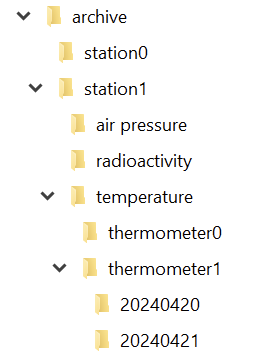
If you implement your archive in the file system, you can probably see the directory structure right before you:

And in each directory for the day, we have a file for each hour:

So we can just write a class that takes our four parameters and returns the corresponding file. That is a straighforward and correct implementation.

It is also one of the implementations that couples your intent (an archive with four dimensions of navigability) nearly inseparably with your decisions on how to use your computer’s basic resources.

Thinking from the algorithms point of view

In order to separate your intent from your current implementation, you need to specify your intent as unencumbered from details as possible. Let’s specify our 4-axis archive nagivation system as a coordinate:

public record ArchiveCoordinate(
    StationId station,
    DataEntryType type,
    DeviceId device,
    LocalDateTime measurementTime
) {
}

There is nothing in here that point towards file system things like directories or files. We might have a hunch of the actual hierarchy by looking at the order of the parameters, but it is easy to implement a hierarchy-free nagivation between coordinates:

public record ArchiveCoordinate([...]) {
    public ArchiveCoordinate withStationChangedTo(
        StationId newStation
    ) {
        [...]
    }
    
    public ArchiveCoordinate withTypeChangedTo(
        DataEntryType newType
    ) {
        [...]
    }
    
    public ArchiveCoordinate withDeviceChangedTo(
        DeviceId newDevice
    ) {
        [...]
    }
    
    public ArchiveCoordinate withMeasurementTimeChangedTo(
        LocalDateTime newMeasurementTime
    ) {
        [...]
    }
}

The concept is that if you know one coordinate, you can navigate relative to it through the archive, without knowingly changing the directory or whatever implementation structure lies beneath your model layer. Let’s say we have the coordinate of a particular measurement of one thermometer. How do we get the same measurement of the other thermometer?

ArchiveCoordinate measurementForThermometer0 = new ArchiveCoordinate([...]);
ArchiveCoordinate measurementForThermometer1 = measurementForThermometer0.withDeviceChangedTo(thermometer1);

We can provide methods that allow us to step forward and backward in time. We can provide our application code with everything it requires to implement clear and concise algorithms based on our model of the archive.

But there will be the moment where you want to “get real” and access the data. You might decide to let your current implementation shine through to your intent layer and provide an actual file:

public interface Archive {
    Optional<File> entryFor(ArchiveCoordinate coordinate);
}

That’s all you need from the archive to get your file. But you might also decide to prolong your intent layer and wrap the file in your own data type that provides everything your algorithms need without revealing that it is really a file that lies underneath:

public interface Archive {
    Optional<ArchiveResource> entryFor(ArchiveCoordinate coordinate);
}

The new ArchiveResource is a thin, but effective veneer (some might call it a wrapper or a facade) that gives us the required information:

public interface ArchiveResource {
    String name();
    long size();
    InputStream read();
}

Of course, we need to provide an implementation for all of this. But by staying vague in the intent layer, we open the door for an implementation that has nothing to do with files. Instead of a file system, there could be a relational database underneath and we wouldn’t notice. Our algorithms would still work the same way and read their data from ArchiveResources that aren’t FileArchiveResources anymore, but DatabaseArchiveResources.

You can probably imagine how you can provide the intent for data writing using the example above. If not, let me show you the necessary additions:

public interface Archive {
    Optional<ArchiveResource> entryFor(ArchiveCoordinate coordinate);
    ArchiveResource createEntryFor(ArchiveCoordinate coordinate) throws IOException;
}
public interface ArchiveResource {
    String name();
    long size();
    InputStream read();
    OutputStream write();
}

Now you can store additional data to the archive without ever knowing if you write to a file or a database or something completely different.

Summary

By separating your intent from your current actual implementation, you gain at least three things for the cost of more work and some harder thinking:

  1. Your algorithms only use your intent layer. You design it exclusively for your algorithms. It will fit like a glove.
  2. The terms you use in your intent layer shape the algorithm metaphors way better than the terms of your current implementation. You can freely decide what terms you’ll use.
  3. The algorithms and your intent layer are designed to last. Your current implementation can be swapped out without them noticing.

If this sounds familiar to you, it is a slightly different take on the “ports and adapters” architecture. The important thing is that by starting with the intent and naming it from the standpoint of your algorithms (application code), you are less prone to let your implementation shine through.

How building blocks can be a game changer for your project

I have just completed my first own project. In this project I have a web server whose main task is to load files and return them as a stream.
In the first version, there was a static handler for each file type, which loaded the file and sent it as a stream.

As part of a refactoring, I then built building blocks for various tasks and the handler changed fundamentally.

The initial code

Here you can see a part of my web server. It offers a path for both images and audio files. The real server has significantly more handlers and file types.

public class WebServer{
    public static void main(String[] args) {
        var app = Javalin.create()
            .get("api/audio/{root}/{path}/{number}", FileHandler::handleAudio)
            .get("api/img/{root}/{path}/{number}", FileHandler::handleImage)
            .start(7070);
    }
}

Below is a simplified illustration of the handlers. I have also shown the imports of the web server class and the web server technology, in this case Javalin. The imports are not complete. They are only intended to show these two dependencies.

import WebServer;
import io.javalin.http.Context;
// ...

public class FileHandler {

    public static void handleImage(Context ctx) throws IOException {
        var resource = Application.class.getClassLoader().getResourceAsStream(
            String.format(
                "file/%s/%s/%s.jpg", 
                ctx.pathParam("root"), 
                ctx.pathParam("path"), 
                ctx.pathParam("fileName")));
        String mimetyp= "image/jpg";

        if (resource != null) {
            ctx.writeSeekableStream(resource, mimetyp);
        }
    }

    public static void handleAudio(Context ctx) {
        var resource = Application.class.getClassLoader().getResourceAsStream(
            String.format(
                "file/%s/%s/%s.mp3", 
                ctx.pathParam("root"), 
                ctx.pathParam("path"), 
                ctx.pathParam("fileName")));
        String mimetyp= "audio/mp3";

        if (resource == null) {
            resource = Application.class.getClassLoader().getResourceAsStream(
            String.format(
                "file/%s/%s/%s.mp4", 
                ctx.pathParam("root"), 
                ctx.pathParam("path"), 
                ctx.pathParam("fileName")));
            mimetyp= "video/mp4";
        }

        if (resource != null) {
            ctx.writeSeekableStream(resource, mimetyp);
        }
    }
}

The handler methods each load the file and send it to the Javalin context. The audio handler first searches for an audio file and, if this is not available, for a video file. The duplication is easy to see. And with the static handler and Javalin dependencies, the code is not testable.

Refactoring

So first I build an interface, called a decorator, for the context to get the Javalin dependency out of the handlers. A nice bonus: I can manage the handling of not found files centrally. In the web server, I then inject the new WebContext instead of the Context.

public interface WebContext {
    String pathParameter(String key);
    void sendNotFound();
    void sendResourceAs(String type, InputStream resource);
    default void sendResourceAs(String type, Optional<InputStream> resource){
        if(resource.isEmpty()){
            sendNotFound();
            return;
        }
        sendResourceAs(type, resource.get());
    }
}

public class JavalinWebContext implements WebContext {
    private final Context context;

    public JavalinWebContext(Context context){
        this.context = context;
    }

    @Override
    public String pathParameter(String key) {
        return context.pathParam(key);
    }

    @Override
    public void sendNotFound() {
        context.status(HttpStatus.NOT_FOUND);
    }

    @Override
    public void sendResourceAs(String type, InputStream resource) {
        context.writeSeekableStream(resource, type);
    }
}

Then I write a method to load the file and send it as a stream.

private boolean sendResourceFor(String path, String mimetyp, Context context){
    var resource = Application.class.getClassLoader().getResourceAsStream(path);
    if (resource != null) {
        context.sendResourceAs(mimetyp, resource);
        return true;
    }
    return false;
}

The next step is to build a loader for the files, which I pass to the no longer static handler during initialization. Here I can run a quick check to see if anyone is trying to manipulate the specified path.

public class ResourceLoader {
    private final ClassLoader context;

    public ResourceLoader(ClassLoader context){
        this.context = context;
    }

    public Optional<InputStream> asStreamFrom(String path){
        if(path.contains("..")){
            return Optional.empty();
        }
        return Optional.ofNullable(this.context.getResourceAsStream(path));
    }
}

Finally, I build an extra class for the paths. The knowledge of where the files are located and how to determine the path from the context should not be duplicated everywhere.

public class FileCoordinate {
    private static final String FILE_CATEGORY = "file";
    private final String root;
    private final String path;
    private final String fileName;
    private final String extension;

    private FileCoordinate(String root, String path, String fileName, String extension){
        super();
        this.root = root;
        this.path = path;
        this.fileName = fileName;
        this.extension = extension;
    }

    private static FileCoordinate pathFromWebContext(WebContext context, String extension){
        return new FileCoordinate(
                context.pathParameter("root"),
                context.pathParameter("path"),
                context.pathParameter("fileName"),
                extension
        );
    }

    public static FileCoordinate toImageFile(WebContext context){
        return FileCoordinate.pathFromWebContext(context, "jpg");
    }

    public static FileCoordinate toAudioFile(WebContext context){
        return FileCoordinate.pathFromWebContext(context, "mp3");
    }

    public FileCoordinate asToVideoFile(){
        return new FileCoordinate(
                root,
                path,
                fileName,
                "mp4"
        );
    }

    public String asPath(){
        return String.format("%s/%s/%s/%s.%s", FILE_CATEGORY, root, path, fileName, extension);
    }
}

Result

My handler looks like this after refactoring:

public class FileHandler {
    private final ResourceLoader resource;

    public FileHandler(ResourceLoader resource){
        this.resource = resource;
    }

    public void handleImage(WebContext context) {
        var coordinate = FileCoordinate.toImageFile(context);
        sendResourceFor(coordinate, "image/jpg", context);     
    }

    public void handleAudio(WebContext context) {
        var coordinate = FileCoordinate.toAudioFile(context);
        var found = sendResourceFor(coordinate, "audio/mp3", context);
        if(!found)
            sendResourceFor(coordinate.asToVideoFile(), "video/mp4", context);
    }

    private boolean sendResourceFor(FileCoordinate coordinate, String mimetype, WebContext context){
        var stream = resource.asStreamFrom(coordinate);
        context.sendResourceAs(mimetype, stream);
        return stream.isPresent();
    }
}

It is much shorter, easier to read and describes more what is done and not how it is technically done. Another advantage is that I can, for example, fully test my FileCoordinate and mock my WebContext.

For just these two handler methods, it still looks like a overkill. Overall, more code has been created than has disappeared and yes, a smaller modification would probably have been sufficient for this handler alone. But my application is not just this handler and most of them are much more complex. For example, I work a lot with json files, which are loaded and which my loader can now simply interpret using an additional function that return a JsonNode instead a stream. The conversion has significantly reduced the complexity of the application, avoided duplications and made the code more secure and testable.

Web Components, Part 2: Encapsulating and Reusing common Element Structure

In my previous post, I gave you some first impressions about custom HTML Web Components. I cut myself short there to make my actual point, but one can surely extend this experiment.

The thing about the DOM is that it is one large, global block of information. In order to achieve loose coupling, you need to exert that discipline by yourself, using document.getElementById() and friends you can easily couple the furthestmost components, to their inner workings, together. Which can make it very insecure to change.

For that problem in Web Components, there is the Shadow DOM. I.e. if you define, as previously, your component as

class CustomIcon extends HTMLElement {
    connectedCallback() {
        this.innerHTML = `
            <svg id="icon">
                <!-- some content -->
            </div>
        `;
        element = document.getElementById("icon");
        element.addEventListener(...);
        // don't forget to removeEventListener(...) in disconnectedCallback()! - but that is not the point here
    }
}

it becomes possible to also document.getElementById("icon") from anywhere globally. Especially with such generic identifiers, you really do not want to leak your inner workings. (Yes, in a very custom application, there might be valid cases of desired behaviour, but then usually the IDs are named as e.g. __framework_global_timeout, custom--modal-dialog, … as to avoid accidental clashes).

This is done as easy as

class CustomIconim d extends HTMLElement {
    constructor() {
        super();
        this.attachShadow({ mode: 'open' });
  }

    connectedCallback() {
        this.shadowRoot.innerHTML = ... // your HTML ere
    }
}

Two points:

  • The attachShadow() can also be called in the connectedCallback(), even if usually not required. Generally, there is some debate between these two options, and I think I’ll write you another episode of this post when I have some further insight about that.
  • The {mode: 'open'} is what you actually use because ‘closed’ does not give you that much benefit, as outlined in this blog here. Just keep in mind that yes, it’s still JavaScript – you can access the shadowRoot object from the outside and then still do your shenanigans, but at least you can’t claim to have done so by accident.

This encapsulation makes it easier to write reusable code, i.e. decrease duplication.

As with my case of the MagicSparkles icon – I might want to implement some other (e.g. Font Awesome) icons and have all of these carry the same “size” attribute. It might look like:

export const addSvgPathAsShadow = (element: HTMLElement, { children, viewBox, defaultColor }: SvgIconProps) => {
    const shadow = element.attachShadow({ mode: "open" });
    const size = element.getAttribute("size") || 24;
    const color = defaultColor || "currentcolor";
    viewBox ||= `0 0 ${size} ${size}`;
    shadow.innerHTML = `
            <svg
                xmlns="http://www.w3.org/2000/svg"
                width="${size}"
                height="${size}"
                viewBox="${viewBox}"
                fill="${color}"
            >
                ${children}
            </svg>
        `;
};

export class PlayIcon extends HTMLElement {
    connectedCallback() {
        addSvgPathAsShadow(this, {
            viewBox: "0 0 24 24",
            children: "<path fill-rule=\"evenodd\" d=\"M4.5 5.653c0-1.427 1.529-2.33 2.779-1.643l11.54 6.347c1.295.712 1.295 2.573 0 3.286L7.28 19.99c-1.25.687-2.779-.217-2.779-1.643V5.653Z\" clip-rule=\"evenodd\" />"
        });
    }
}

// other elements can be defined similarly

// don't forget to actually define the element tag somewhere top-level, as with:
// customElements.define("play-icon", PlayIcon);

Note that

  • this way, children is required as a fixed string. My experiment didn’t work out yet how to use the "<slot></slot>" here (to pass the children given by e.g. <play-icon>Play!</play-icon>)
  • Also, I specifically use the || operator for the default values – not the ?? – as an attribute given as empty string would not be defaulted otherwise (?? only checks for undefined or null).
Conclusion

As concluded in my first post, we see that one tends to recreate the same patterns as already known from the existing frameworks, or software architecture in general. The tools are there to increase encapsulation, decrease coupling, decrease duplication, but there’s still no real reason why not just to use one of the frameworks.

There might be at some point, when framework fatigue is too much to bear, but try to decide wisely.

Four-way Navigation in UIs

Just yesterday, I was working on the task of enabling gamepad navigation of a graphical UI. I had implemented this before in my game abstractanks but since forgotten how exactly I did it. So I opened the old code and tried to decipher it, and I figured that’d make a nice topic to write about.

Basic implementation

Let’s break down the simple version of the problem: You have a bunch of rectangular controls, and given a specific one, figure out the next one with an input of either left, up, right or down.

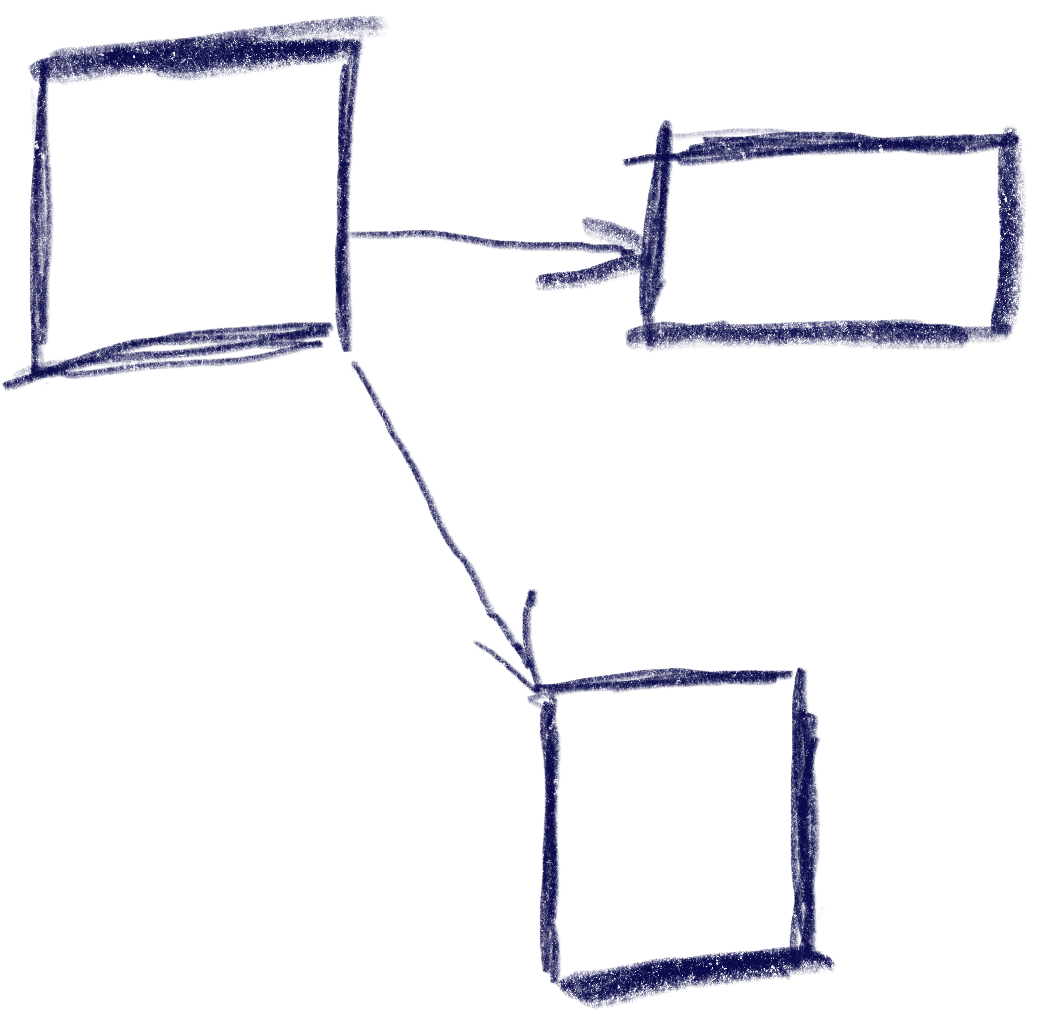
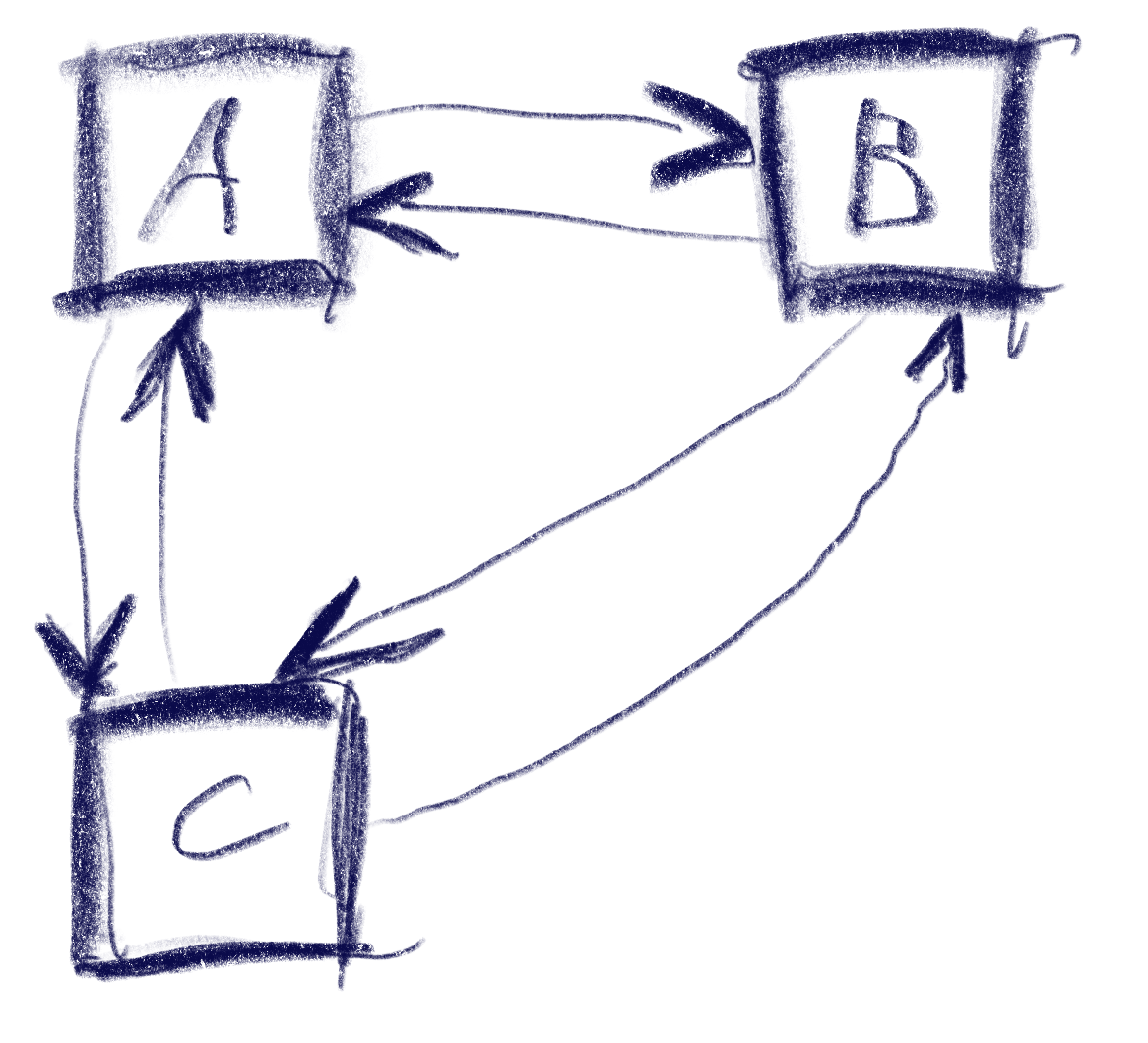
This sketch shows a control setup with a possible solution. It also contains an interesting situation: going ‘down’ from B box goes to C, but going up from there goes to A!

The key to creating this solution is a metric that weights the gap for a specific input direction, e.g. neighbor_metric(
box<> const& from, box<> const& to, navigation_direction direction)
. To implement this, we need to convert this gap into numbers we can use. I’ve used a variant of Arvo’s algorithm for that: For both axes, get the difference of the rectangles’ intervals along that axis and store those in a 2d-vector. In code:

template <int axis> inline float difference_on_axis(
box<> const& from, box<> const& to)
{
if (to.min[axis] > from.max[axis])
return to.min[axis] - from.max[axis];
else if (to.max[axis] < from.min[axis])
return to.max[axis] - from.min[axis];
return 0.f;
}

v2<> arvo_vector(box<> const& from, box<> const& to)
{
return {
difference_on_axis<0>(from, to),
difference_on_axis<1>(from, to) };
}

That sketch shows the resulting vectors from the box in the top-left going to two other boxes. Note that these vectors are quite different from the difference of the boxes’ centers. In the case of the two top boxes, the vector connecting the centers would tilt down slightly, while this one is completely parallel to the x axis.

Now armed with this vector, let’s look at the metric I was using. It results in a 2d ‘score’ that is later compared lexicographically to determine the best candidate: the first number determines the ‘angle’ with the selected axis, the other one the distance.

template <int axis> auto metric_on_axis(box<> const& from, box<> const& to)
{
auto delta = arvo_vector(from, to);
delta[0] *= delta[0];
delta[1] *= delta[1];
auto square_distance = delta[0] + delta[1];

float cosine_squared = delta[axis] / square_distance;
return std::make_pair(-cosine_squared, delta[axis]);
}

std::optional<std::pair<float, float>> neighbor_metric(
box<> const& from, box<> const& to, navigation_direction direction)
{
switch (direction)
{
default:
case navigation_direction::right:
{
if (from.max[0] >= to.max[0])
return {};
return metric_on_axis<0>(from, to);
}
case navigation_direction::left:
{
if (from.min[0] <= to.min[0])
return {};
return metric_on_axis<0>(from, to);
}
case navigation_direction::up:
{
if (from.max[1] >= to.max[1])
return {};
return metric_on_axis<1>(from, to);
}
case navigation_direction::down:
{
if (from.min[1] <= to.min[1])
return {};
return metric_on_axis<1>(from, to);
}
}
}

In practice this means that the algorithm will favor connections that best align with the input direction, while ties resolved by using the closest candidate. The metric ‘disqualifies’ candidates going backward, e.g. when going right, the next box cannot start left of the from box.

Now we just need to loop through all candidates and the select the one with the lowest metric.

This algorithm does not make any guarantees that all controls will be accessible, but that is a property that can easily be tested by traversing the graph induced by this metric, and the UI can be designed appropriately. It also does not try to be symmetric, e.g. going down then up does not always result in going back to the previous control. As we can see in the first sketch, this is not always desirable. I think it’s nice to be able to go from B to C via ‘down’, but I’d be weird to go ‘up’ back there instead of A. Instead, going ‘right’ to B does make sense.

Hard cases

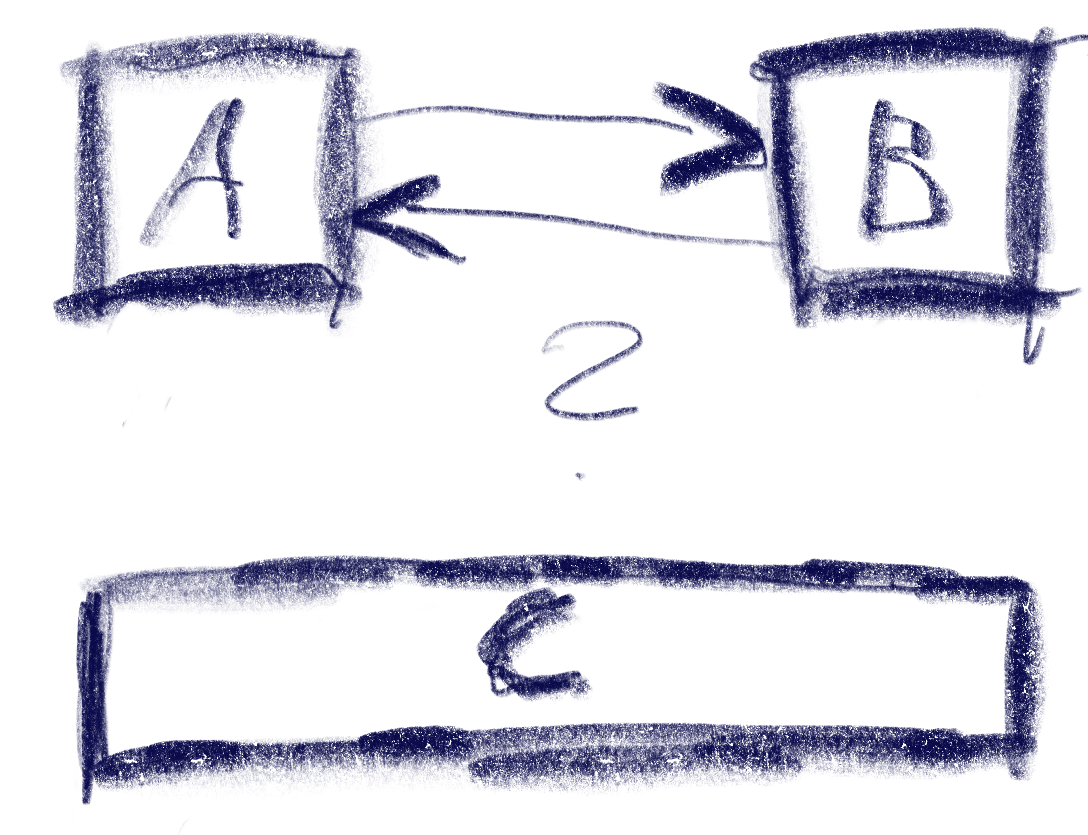
But there can be ambiguities that this algorithm does not quite solve. Consider the case were C is wider, so that is is also under B:

The algorithm will connect both A and B down to C, but the metric will be tied for A and B going up from C. The metric could be extended to also include the ‘cross’ axis min-point of the box, e.g. favoring left over right for westerners like me. But going from B down to C and then up to A would feel weird. One idea to resolve this is to use the history to break ties, e.g. when coming from B to C, going back up would go back to C.

Another hard case is scroll-views. In fact, they seem to change the problem domain. Instead of treating the inputs as boxes in a flat plane, navigating in a scroll view requires to navigate to potentially only partially visible or even invisible boxes and bringing them into view. I’ve previously solved this by treating every scroll-view as its own separate plane and navigating only within that if possible. Only when no target is found within the scroll-view, did the algorithm try to navigate to items outside.

Swagger-ui for any JVM-based backend

We often implement web applications with a React frontend and one of a large pool of backend frameworks/technologies. These include Micronaut, .NET Framework, Javalin, Flask, Eclipse Jetty among others.

A documentation of the API that allows calling the endpoints can be very helpful even during development to illustrate the API usage. OpenAPI and implementations like Swagger and Swashbuckle fulfill this task quite well.

While many of the backend frameworks support documenting and calling the API using Swagger-UI out-of-the-box or using plugins some frameworks like Undertow do not have direct support for it. Nevertheless, it is relatively easy to add an OpenAPI documentation with a web interface to almost any backend. We demonstrate the setup here using Undertow because it is used in some of our projects.

Adding dependencies and build config

Since we mostly use Gradle for our JVM-based backends we will highlight the additions to build.gradle to make to generate the OpenAPI definition. It consists of the following steps:

  • Adding the Swagger gradle plugin
  • Adding dependencies for the required annotations
  • Configuring the resolve-task of the gradle plugin

Here is an example exerpt of our build.gradle:

plugins {
  id 'java'
  id 'application'
// ...
  id "io.swagger.core.v3.swagger-gradle-plugin" version "2.2.20"
}

dependencies {
// ...
    implementation 'io.undertow:undertow-core:2.3.12.Final'
    implementation 'io.undertow:undertow-servlet:2.3.12.Final'
    implementation 'io.swagger.core.v3:swagger-annotations:2.2.20'
    implementation 'org.jboss.resteasy:jaxrs-api:3.0.12.Final'
}

resolve {
    outputFileName = 'demo-server'
    outputFormat = 'JSON'
    prettyPrint = 'TRUE'
    classpath = sourceSets.main.runtimeClasspath
    resourcePackages = ['com.schneide.demo.server', 'com.schneide.demo.server.api']
    outputDir = layout.buildDirectory.dir('resources/main/swagger').get().asFile
}

Adding the annotations

We need to add some annotations to our code so that the OpenAPI JSON (or YAML) file will be generated.

The API root class looks like below:

@OpenAPIDefinition(info =
@Info(
        title = "Demo Server Web-API",
        version = "0.11",
        description = "REST API for the demo web application..",
        contact = @Contact(
                url = "https://www.softwareschneiderei.de",
                name = "Softwareschneiderei GmbH",
                email = "kontakt@softwareschneiderei.de")
)
)
public class ApiHandler {
    public ApiHandler() {
        super();
    }

    /**
     *  Connect our handlers
     */
    public RoutingHandler createApiHandler() {
        final RoutingHandler api = new RoutingHandler();
        api.get("/demo", new DemoHandler());
        // ...
        return api;
    }
}

We also refactored our handlers to separate the business api and the Undertow handler interface methods to generate a expressive API.

The result looks something like this:

@Path("/api/demo")
public class DemoHandler implements HttpHandler {
    public DemoHandler() {
        super();
    }

    @Override
    public void handleRequest(HttpServerExchange exchange) throws Exception {
         exchange.getResponseHeaders().put(Headers.CONTENT_TYPE, "application/json");
            final Map<String, Deque<String>> params = exchange.getQueryParameters();
            final int month = Integer.parseInt(params.get("month").getFirst());
            final int year = Integer.parseInt(params.get("year").getFirst());
        exchange.getResponseSender().send(new Gson().toJson(getDaysIn(year, month)));
    }

    @GET
    @Operation(
            summary = "Get number of days in the given month and year",
            responses = {
                    @ApiResponse(
                            responseCode = "200",
                            description = "A number of days in the given month and year",
                            content = @Content(mediaType = "application/json",
                                    schema = @Schema(implementation = Integer.class)
                            )
                    )
            }
    )
    public Integer getDaysIn(@QueryParam("year") int year, @QueryParam("year") int month) {
        return YearMonth.of(year, month).lengthOfMonth();
    }
}

When running the resolve task all of the above results in a OpenAPI definition file in build/resources/main/swagger/demo-server.json.

Swagger-UI for the API definition

Now that we have this API definition we can use it to generate clients and – more important to us – generate a web UI documenting the API and allowing to execute and demo the functionality. For this we simply download the Swagger-UI distribution and place the contents of the dist/ folder in src/main/resources/swagger-ui. We then have to let Undertow serve definition and UI like so:

class DemoServer {
    public DemoServer() {
        final GracefulShutdownHandler rootHandler = gracefulShutdown(createHandler());
        Undertow.builder().addHttpListener(8080, "localhost").setHandler(rootHandler).build().start();
    }

    private HttpHandler createHandler() {
        return path()
                .addPrefixPath("/api", new ApiHandler().createApiHandler())
                .addPrefixPath("/swagger-ui", resource(new ClassPathResourceManager(getClass().getClassLoader(), "swagger-ui/"))
                        .setWelcomeFiles("index.html"))
                .addPrefixPath("/swagger", resource(new ClassPathResourceManager(getClass().getClassLoader(), "swagger/")));
    }
}

Note: I tried using the swagger-ui webjar but was unable to configure the location (the URL) of my OpenAPI definition file. Therefore I used the plain swagger-ui download instead.

Wrapping it up

We have to do some setup work and potentially some refactorings to provide a meaninful API documentation for our backend. After this work it is mostly adding some Annotations to methods and types used in your web API.

Spicing up the Game of Life Kata – Part I

Conway’s Game of Life is a worthwhile coding kata that I’ve implemented probably hundreds of times. It is compact enough to be completed in 45 minutes, complex enough to benefit from Test First or Test Driven Development and still maintains a low entry barrier so that you can implement it in a foreign programming language without much of a struggle (except if the foreign language is APL).

And despite appearing to be a simple 0-player game with just a few rules, it can yield to deep theory, as John Conway explains nicely in this video. Oh, and it is turing complete, so you can replicate a Game of Life in Game of Life – of course.

But after a few dozen iterations on the kata, I decided to introduce some extra aspects to the challenge – with sometimes surprising results. This blog series talks about the additional requirements and what I learnt from them.

Additional requirement #1: Add color to the game

The low effort user interface of the Game of Life is a character-based console output of the game field for each generation. It is sufficient to prove that the game runs correctly and to watch some of the more advanced patterns form and evolve. But it is rather unpleasing to the human eye.

What if each living cell in the game is not only alive, but also has a color? The first generation on the game field will be very gaudy, but maybe we can think about “color inheritance” and have the reproducing cells define the color of their children. In theory, this should create areas of different colors that can be tracked back to a few or even just one ancestor.

Let’s think about it for a moment: When all parent cells are red, the child should be red, too. If a parent is yellow and another one is red, the child should have a color “on the spectrum” between yellow and red.

Learning about inheritance rules

One specific problem of reproduction in the Game of Life is that we don’t have two parents, we always have three of them:

Any dead cell with exactly three live neighbors becomes a live cell, as if by reproduction.

Rule #4 of Game of Life

We need to think about a color inheritance rule that incorporates three source colors and produces a target color that is somehow related to all three of them:

f(c1, c2, c3) → cn

A non-harebrained implementation of the function f is surprisingly difficult to come up with if you stay within your comfort zone regarding the representation of colors in programming languages. Typically, we represent colors in the RGB schema, with a number for the three color ingredients: red, green and blue. If the numbers range from zero to one (using floating-point values) or from zero to 255 (using integer values) or even some other value range doesn’t really matter here. Implementing the color inheritance function using RGB colors adds so many intricacies to the original problem that I consider this approach a mistake.

Learning about color representations

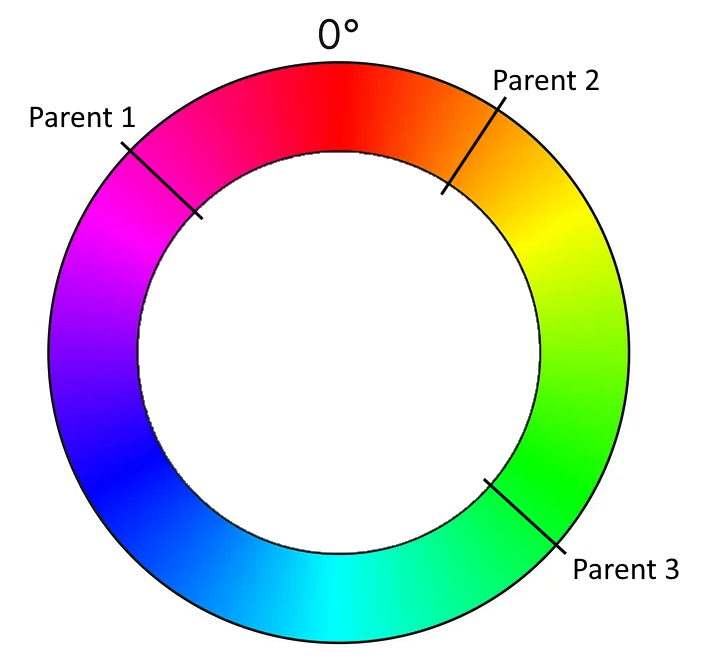
When we search around for alternative color representations, the “hue, saturation and brightness” or HSB approach might capture your interest. The interesting part is the first parameter: hue. It is a value between 0 and 360, with 0 and 360 being identically and meaning “red”. 360 is also the number of degrees in a full circle, so this color representation effectively describes a “color wheel” with one number.

This means that for our color inheritance function, the parameters c1, c2 and c3 are degrees beween 0 and 360. The whole input might look like this:

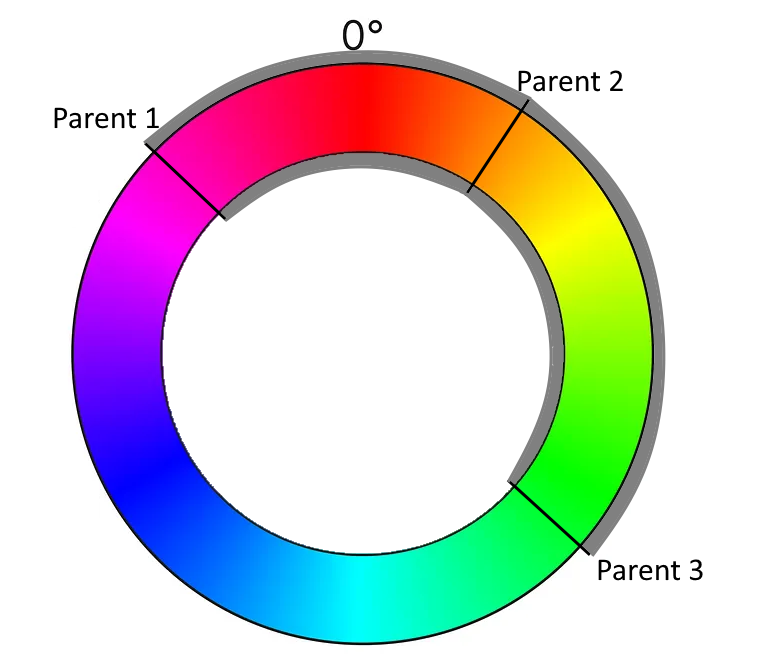
Just by looking at the graphics, you can probably already see the color spectrum that is suitable for the function’s result. Instead of complicated color calculations, we pick an angle somewhere between two angles (with the third angle defining the direction).

And this means that we have transformed our color calculation into a geometric formula using angles. We can now calculate the span between the “leftmost” and the “rightmost” angle that covers the “middle” angle. We determine a random angle in this span and use it as the color of the new cell.

Learning about implicit coupling

But there are three possibilities to calculate the span! Depending on what angle you assign the “middle” role, there are three spans that you can choose from. If you just take your parent cells in the order that is given by your data structure, you implement your algorithm in a manner that is implicitly coupled to your technical representation. Once you change the data structure ever so slightly (for example by updating your framework version), it might produce a different result regarding the colors for the exact same initial position of the game. That is a typical effect for hardware-tied software, as the first computer games were, but also a sign of poor abstraction and planning. If you are interested in exploring the effects of hardware implications, the game TIS-100 might be for you.

We want our implementation to be less coupled to hardware or data structures, so we define that we use the smallest span for our color calculation. That means that our available colors will rapidly drift towards a uniform color for every given isolated population on our game field.

Learning about long-term effects (drifts)

But that is not our only concern regarding drifts. Even if you calculate your color span correctly, you can still mess up the actual color pick without noticing it. The best indicator of this long-term effect is when every game you run ends in the green/cyan/blue-ish region of the color wheel (the 50 % area). This probably means that you didn’t implement the equivalence of 0° and 360° correctly. Or, in other words, that your color wheel isn’t a wheel, but a value range from 0 to 360, but without wrap-around:

You can easily write a test case that takes the wrap-around into account.

But there are other drifts that might effect your color outcomes and those are not as easily testable. One source of drift might be your random number generator. Every time you pick a random angle from your span, any small tendency of the random number generator influences your long-term results. I really don’t know how to test against these effects.

A more specific source of drift is your usage of the span (or interval). Is it closed (including the endpoints) or open (not including the endpoints)? Both options are possible and don’t introduce drift. But what if the interval is half-open? The most common mistake is to make it left-closed and right-open. This makes your colors drift “counter-clockwise”, but because you wrapped them correctly, you don’t notice from looking at the colors only.

I like to think about possible test cases and test strategies that uncover those mistakes. One “fun” approach is the “extreme values random number generator” that only returns the lowest or highest possible number.

Conclusion

Adding just one additional concept to a given coding kata opens up a multitude of questions and learnings. If you add inheritable colorization to your Game of Life, it not only looks cooler, but it also teaches you about how a problem can be solved easier with a suitable representation, given that you look out for typical pitfalls in the implementation.

Writing (unit) test cases for those pitfalls is one of my current kata training areas. Maybe you have an idea how to test against drifts? Write a comment or even a full blogpost about it! I would love to hear from you.